

The spec the agent writes, the manager follows.
People who code with AI write the spec before the code. In Tasskee it becomes a living project document: your agent reads and updates it through MCP while it works, and the status, progress and tasks show up for the team instantly.
The spec stops being a file only the agent reads
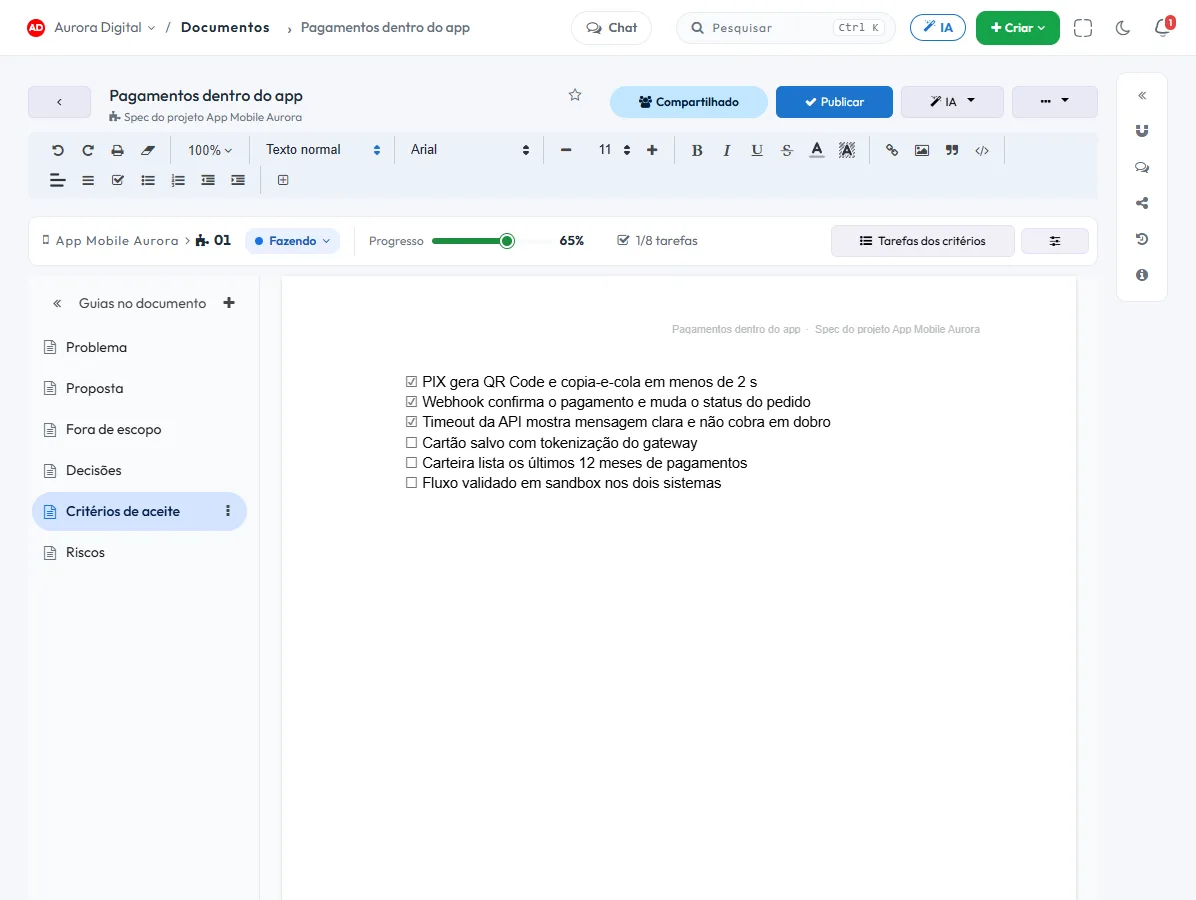
In the repository, the spec only talks to whoever codes. Here it lives in the project folder, with a number, status and progress, and the manager sees what the agent did without opening the code.
Your agent, through MCP
Claude Code, Cursor or any MCP client creates the spec, reads and writes section by section, ticks off acceptance criteria and links tasks, with its own token.
Live status and progress
To do, In progress and Done, plus the percentage the agent updates with each step. It is the number the manager follows.
From spec to tasks
Each open acceptance criterion can become a project task, and the "3/8 tasks" counter tracks on its own how many are already closed.
Per-project permissions
Each profile can view, edit, create or delete specs project by project, and the agent follows the same rules as whoever connected it.
The agent works on the spec. You watch it happen.
Tasskee is an MCP server with tools built for specs. The agent reads only the section it needs, updates what it did and logs progress — no copy and paste, and without stepping on whoever is editing the same text.
- 1Connect the agent Generate a token in Tasskee and paste it into Claude Code, Cursor or your MCP client.
- 2Ask in plain language "Implement spec 01 of the Mobile App." The agent reads the spec and moves the status to In progress.
- 3Stay informed without asking Checked criteria, progress and tasks change in Tasskee while it codes, with version history.
One folder per project, with the progress of each spec
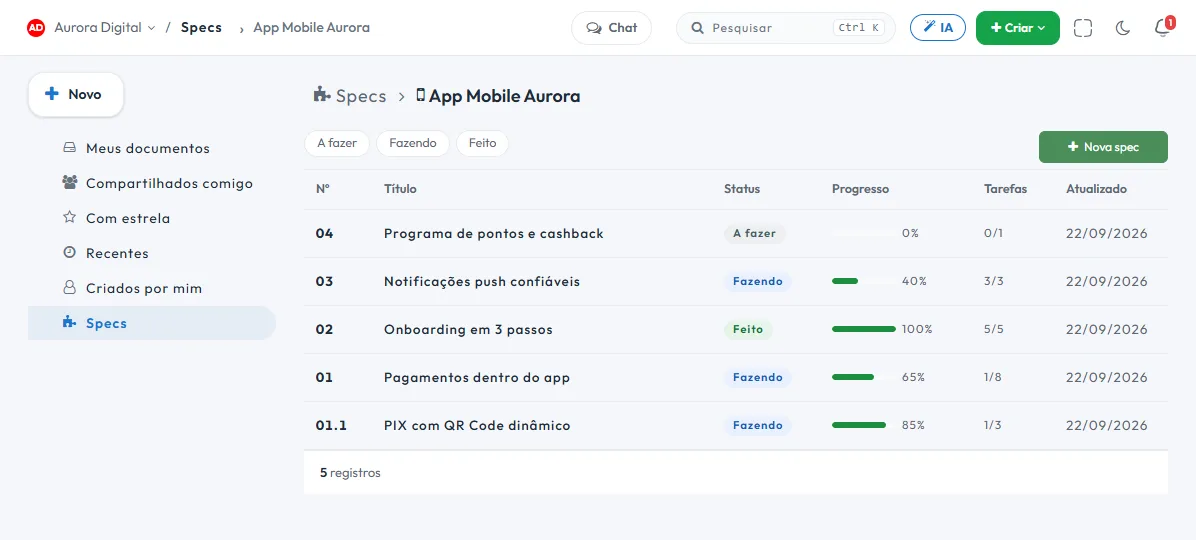
The manager opens the project folder and sees, in a list, what is to do, what is in progress and what has already been delivered — with the progress and tasks of each spec.
- To do, In progress and Done statuses, with filtering
- Percentage progress reported by the agent
- Closed tasks out of the total, counted automatically
- Numbered sub-specs (01.1) under the parent spec
Whoever opens the task finds the spec that explains it
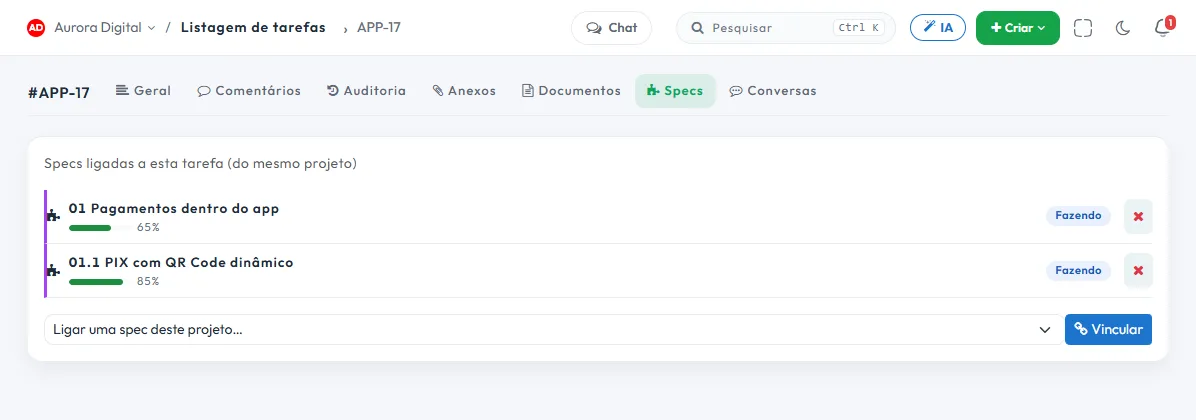
The task gets a Specs tab, with the specs from the same project linked to it, plus the status and progress of each one. Whoever picks up the task understands why without searching.
- A spec and a task only link within the same project
- Mentioning the task with # in the spec text already counts toward progress
This lives alongside the rest of the operation
Task, schedule, ticket, goal, and conversation are the same database. What changes in one place shows up in the other, with nothing to export.
How to use specs with an AI agent in practice
Anyone who codes with an AI agent knows what happens without a specification: the agent does what it understood, not what you wanted. The spec fixes that, and in Tasskee it also lets the manager follow along without opening the code. Here's the real flow, from token to progress.
Step by step
- Generate the MCP token in Tasskee. It has an expiry and a scope, and you can revoke it whenever you want. The agent sees only what the person who connected it can see.
- Paste the token into your client. It works with any MCP-compatible client, like Claude Code, Claude Desktop, Cursor and VS Code.
- Choose where the spec lives. Only in Tasskee, only in the repository (Tasskee keeps a mirror) or both. In the first conversation the agent asks which mode.
- Ask in plain language: "implement spec 01 of the Mobile App". The agent checks the section map, reads only the one it needs and sets the status to In progress.
- Let it check off the criteria and link the tasks. With each step forward it updates the section, links the task and reports the percentage.
- Follow along through the project folder. The list shows To do, In progress and Done, the progress, and the closed tasks out of the total.
Anatomy of a good spec
The agent follows what's written, so the quality of the spec defines the quality of the delivery. A structure that works:
- Problem: what hurts today, in two or three sentences.
- Proposal: what will be done.
- Out of scope: what won't be done. It's the section that prevents the most rework.
- Decisions: choices already made and why.
- Acceptance criteria: a list of verifiable checkboxes. "Webhook confirms the payment" is verifiable. "It's fast" isn't.
Each open criterion can become a project task, and the closed-tasks counter updates on its own. Specs and tasks can only be linked within the same project.
Examples by type of team
Software house in Florianópolis
The project manager creates the spec for a billing module with eight criteria. The developer asks the agent to implement it. In Monday's meeting, the manager opens the folder, sees the spec at 65% with three closed tasks, and doesn't need to ask anyone. For sprints, see how to use sprints.
App startup in São Paulo
Two people and an agent. The spec lives in the repository and Tasskee keeps the mirror, so the business partner can follow along without getting into Git. Numbered sub-specs, like 01.1, separate the smaller deliverables under the parent spec.
IT team at a manufacturer in Joinville
The analyst uses the agent to automate an internal report. Per-project permissions ensure the agent only sees what the analyst sees. If someone opens the same spec in the editor, the agent's write is refused, so nobody overwrites anybody.
Best practices
- One spec, one deliverable outcome. A spec that tries to cover everything has no progress you can track.
- Verifiable criteria. If you can't tick the checkbox with a test or a check, rewrite it.
- Cite the task with # in the text. That already counts toward progress.
- Let the agent write by section. Changing one criterion doesn't touch the rest of the text.
- The manager reads progress, not code. Agree on this up front.
Common mistakes
| Mistake | Consequence |
|---|---|
| A spec without "out of scope" | The agent does more than it should |
| A vague criterion | Progress doesn't mean anything |
| A token shared between people | You lose traceability of who asked |
| Never reviewing what the agent checked off | "Done" without being ready |
Specs from the Start plan; MCP on Pro
Specs are available from the Start plan. The agent connected via MCP is part of Pro and Max, and in the 15-day trial everything is unlocked. The AI uses your key or subscription, with no Tasskee credits. To understand the reasoning behind the design, read MCP: the AI that works on the project.
Specs are siblings of documents and work together with the AI assistant. For the backlog and sprint concept that feeds all of this, there's the backlog and sprint template.
Questions about specs
What is a spec?
Which agents work?
What about the spec that is already in my repository?
Can the agent overwrite what I'm editing?
Who sees the specs?
Connect your agent and watch the spec move
Create a free account, open the project's specs folder and generate the MCP token. In five minutes the agent is already updating progress.