

Goals that move alongside the work.
The problem with OKRs was never defining the goal: it is keeping it alive. Here the progress of each key result goes up on its own as the tasks linked to it are completed.
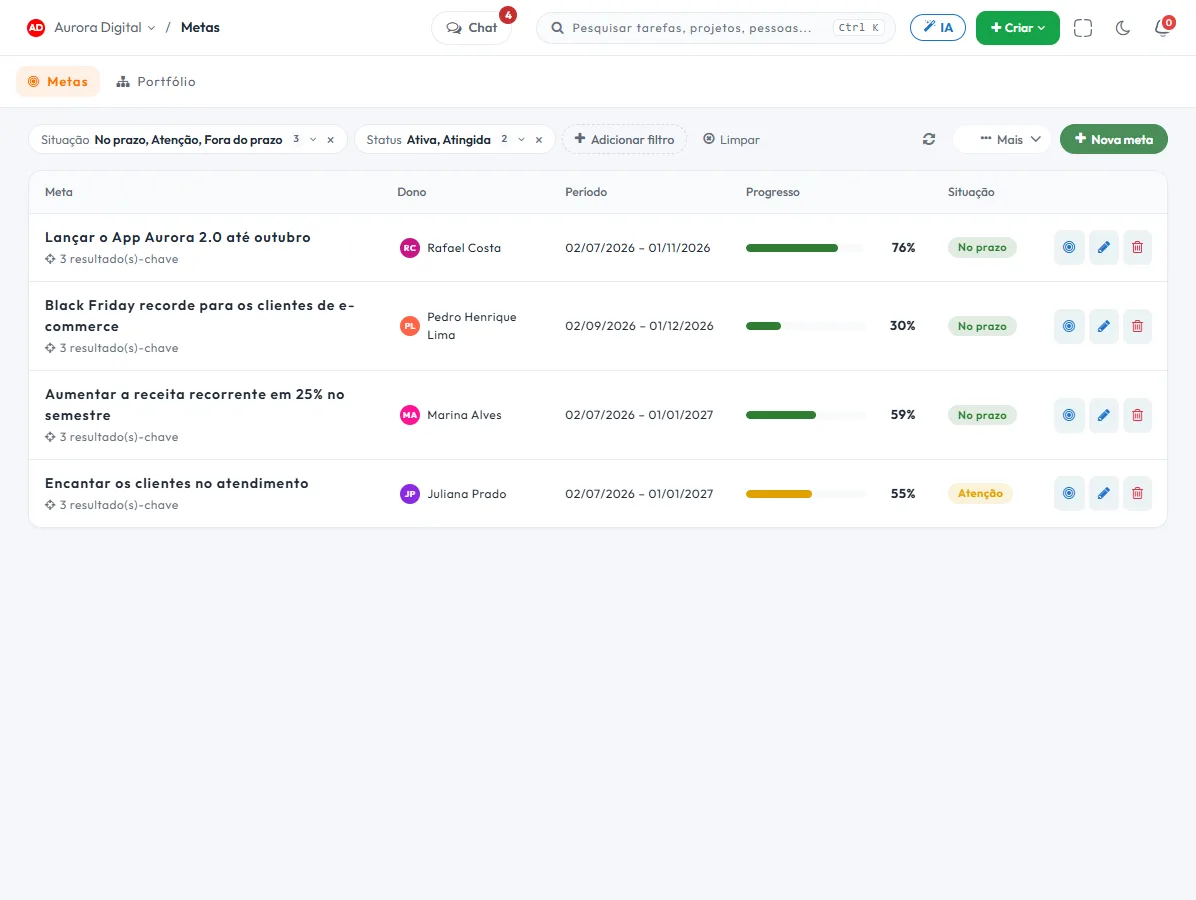
From the executive board to the team board
A goal that lives in a quarterly presentation dies in the second month. Linked to tasks, it updates itself without anyone having to remember.
An objective with an owner and a deadline
Each objective has an owner, a period and measurable key results — not a nice sentence with no number.
Automatic progress
The key result moves as the tasks linked to it are completed, with no side spreadsheet.
Cascading goals
The company goal breaks down into department goals, and you can see the whole portfolio on one screen.
Check-in and summary
Calculated status (on track, attention or off track) and a weekly email summary so the conversation starts with facts.
The Monday meeting screen
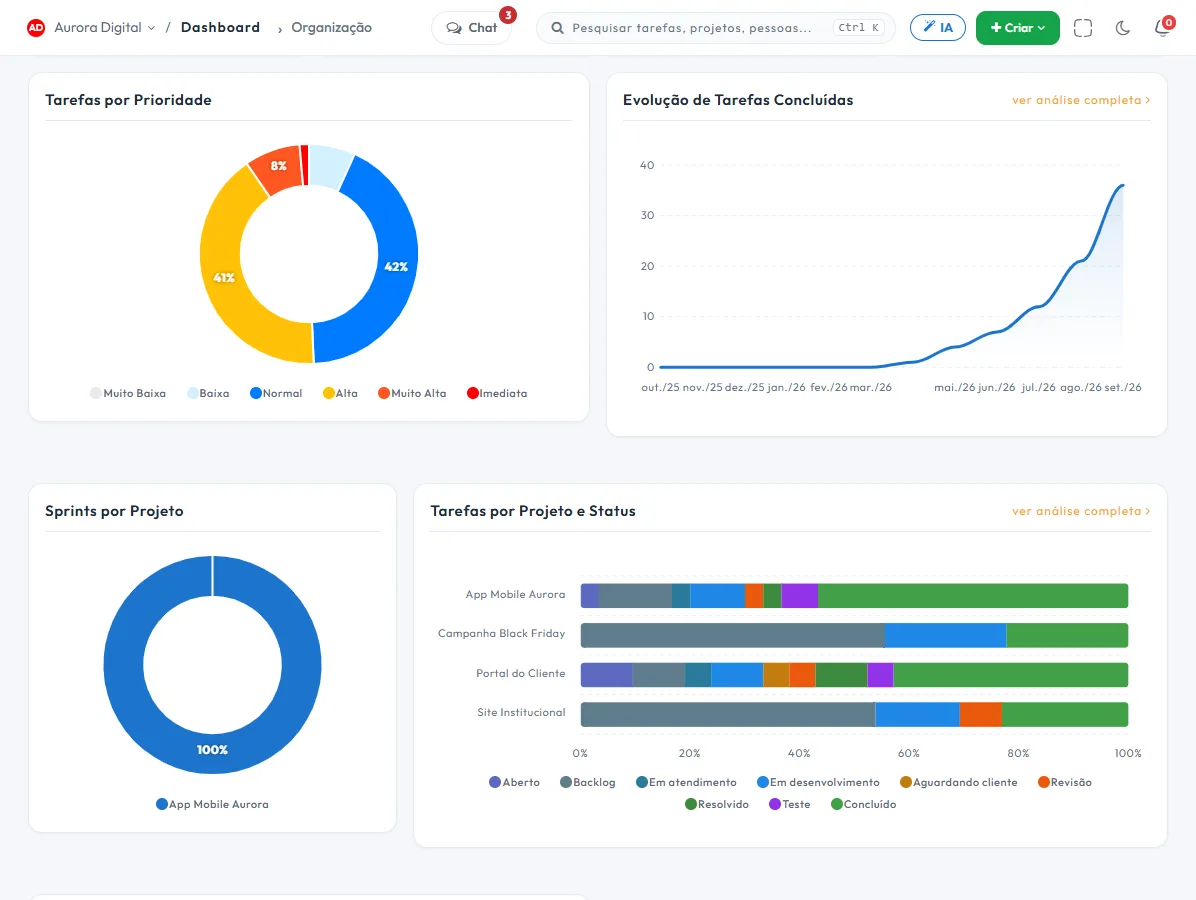
Portfolio, team and organization dashboards bring together on one screen the health of each project, each person's load and the delivery trend — including what is dragging the goal down.
- Projects at risk and overdue at a glance
- Workload per person, before assigning one more deliverable
- Organization delivery trend over time
- Overdue goals linked to the projects that support them
This lives alongside the rest of the operation
Task, schedule, ticket, goal, and conversation are the same database. What changes in one place shows up in the other, with nothing to export.
How to use goals and OKRs in practice, from the first objective to the check-in
The problem with OKRs is rarely writing the objective. It's keeping the number alive after the first week. In Tasskee, the goal links to the tasks and projects that support it, so progress goes up as work is completed. Here's how to set up your first cycle.
Step by step for the first quarter
- Write the objective in one sentence. It says where you want to get to, with no number. Example: "Be the go-to name in preventive maintenance in the region".
- Define two to five key results with a number. This is what gets measured. "Close 12 preventive maintenance contracts" works. "Improve customer service" doesn't.
- Give it an owner and a period. Each objective has one person responsible and a deadline. A goal without an owner is decoration.
- Link tasks or projects to each key result. As they're completed, the percentage advances on its own. The goal's progress is calculated from the key results: there's no "set the goal's progress" by hand.
- Where you can't link, use the check-in. For a number that comes from outside, like the month's revenue, the owner updates the value in the check-in.
- Cascade it down. The company goal breaks down into the departments' goals, and the portfolio shows everything on one screen.
- Bring the weekly summary to the meeting. The status is calculated (on track, at risk or off track) and arrives by email, so the conversation starts with facts.
A good and a bad key result
| Bad | Better | Why |
|---|---|---|
| Improve project delivery | Deliver 90% of projects by the agreed deadline | It has a number and can be measured |
| Launch the new website | Publish 15 service pages by 11/30 | A result, not an activity |
| Hold a weekly meeting | Cut tickets open for more than 7 days from 20 to 10 | Measures an effect, not a ritual |
Examples by type of company
Accounting firm in Blumenau
Objective: "Close the tax quarter without the rush". Key results: deliver 100% of March's obligations before the deadline and reduce rework on payment slips. Each obligation is a task linked to the key result, so the percentage goes up as the team completes them. The partner sees the goal on Monday without asking for a spreadsheet.
Marketing agency in Recife
Objective: "Double client recurrence". Key result: renew 8 of the 10 contracts expiring this quarter. Each client's projects are linked to the goal, and the manager talks about the ones that are at risk.
Network infrastructure company in Palhoça
Objective: "Reduce deployment time". Key result: complete the quarter's projects within the deadline. Here the projects come in as links, and the Gantt schedule shows what's dragging the goal down.
Best practices
- Few goals. Three well-tracked objectives beat ten forgotten ones.
- Review every week, not every quarter. The weekly summary exists for that.
- Separate goals from tasks. The goal is the effect you want. The task is the work that produces it.
- Use the portfolio dashboard to see off-track goals linked to the projects that support them.
- Control visibility. Leadership sees status and trend without getting into task details, and permissions define who sees what.
Common mistakes
- A key result that's a list of tasks. "Do 10 things" measures effort. Measure the result.
- A goal with nothing linked. Without links, progress depends on someone remembering the check-in.
- Expecting 100% every quarter. In OKRs it's common to aim high. Hitting everything every time usually means the goal was too easy.
- Updating only at the end. The goal becomes a retrospective instead of a decision tool.
How to run the Monday meeting
Open the goals dashboard and start with those at risk or off track. For each one, ask just two things: what's blocking it and who fixes it by when. The answer becomes a task, linked to the same key result, and the following week the progress shows whether the decision worked. Goals on track take one minute of the meeting, not ten.
Do I have to use the full OKR method?
No. The format is an objective plus key results, but many teams use it just to track three or four numbers for the quarter, and that already does the job. If you want to understand the method first, read the OKR guide. To start with something ready-made, use the OKR template, and for the day to day of small teams, see OKRs for small businesses.
Goals are part of the Pro plan, with a 15-day trial and no card. After linking your first tasks, open the reports and dashboards to see the delivery trend over time.
Questions about goals and OKRs
Do I need to use OKRs to use goals?
How does progress go up on its own?
Can leadership view it without touching tasks?
Connect strategy to Wednesday's work
Create a free account, try Pro for 15 days and watch the goal move on its own.