

Requests that arrive ready, sign-offs that arrive signed.
Instead of a loose request on someone's WhatsApp, a form with the fields you need. Each submission goes into the right project, with an assignee and deadline — or is kept as a receipt, with the terms the person read and their signature.
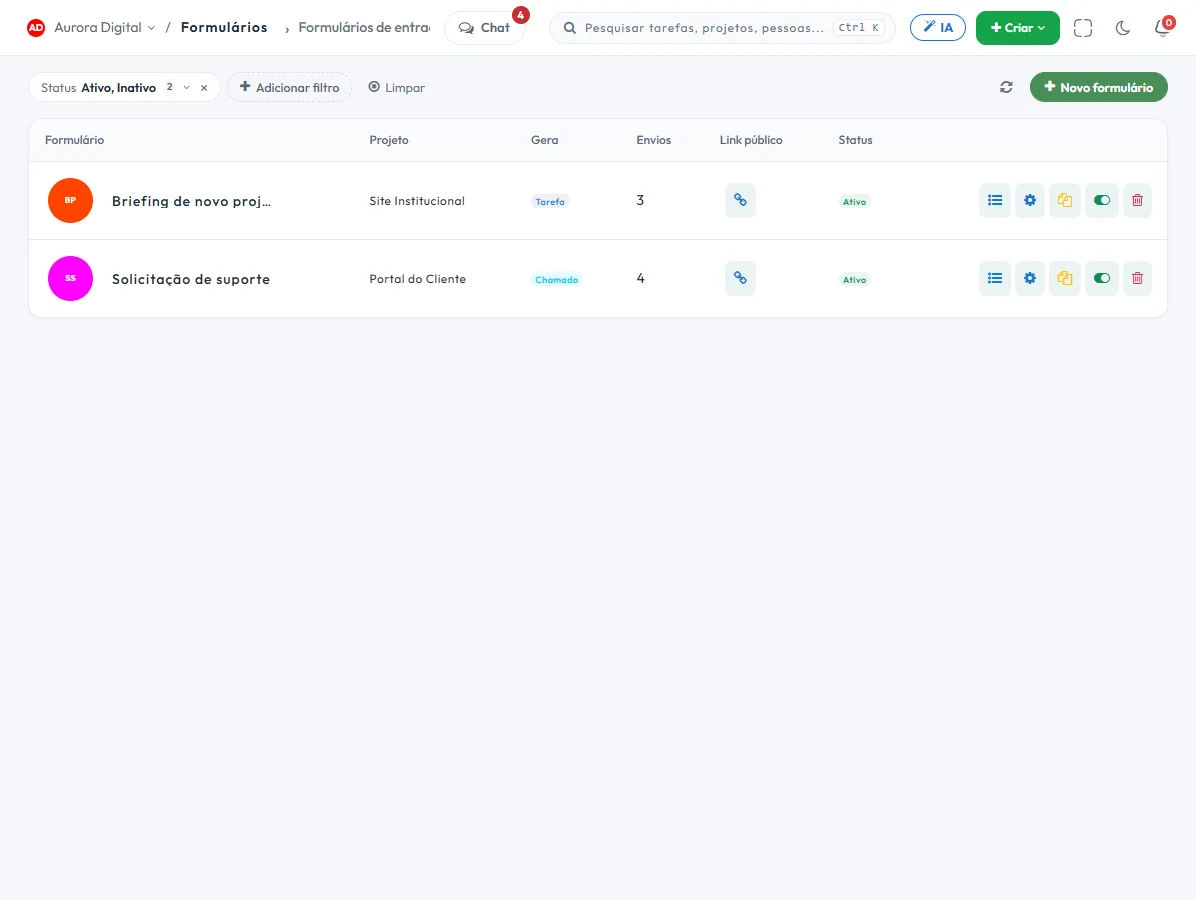
The end of "send me the details, please"
When a request arrives incomplete, someone on the team spends two days asking the basics. The form asks first — and, when what you need is a sign-off, collects the signature too.
One public link, or one per project
One general link, or several per-project links, each with its own expiry and submission limit. The submission goes straight into the link's project.
Task, ticket or evidence
Each submission opens the task or ticket in the project and column you set. Or it stays only as a receipt, without creating a task, and notifies whoever owns the form.
Fields for your process
Text, choice, date, CPF (Brazilian tax ID), file or photo, signature and custom fields, with conditional logic to ask only what matters.
Material alongside the questions
Publish the call for bids, the manual, the floor plan or the photo of the template in the form itself: whoever fills it in sees it before answering.
The receipt that proves what was accepted
Turn on the signature and the form becomes an acceptance document: whoever fills it in reads the terms, signs on screen and the submission keeps the proof — exactly as it was given.
- Links to the terms of use and privacy policy, and the contract as a PDF, above the acceptance checkbox
- Signature drawn with a finger or mouse, or uploaded as an image
- Name, CPF (Brazilian tax ID), IP, date and time saved together with the answers
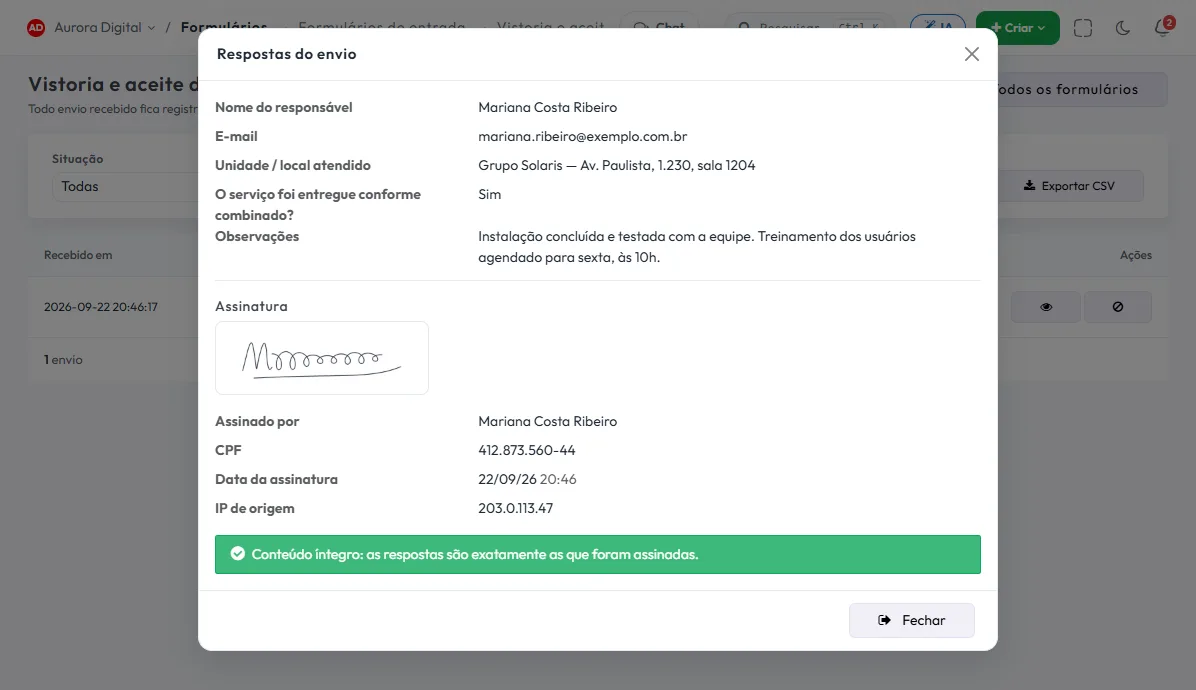
- Integrity seal: if the response changes after it is signed, the screen warns you
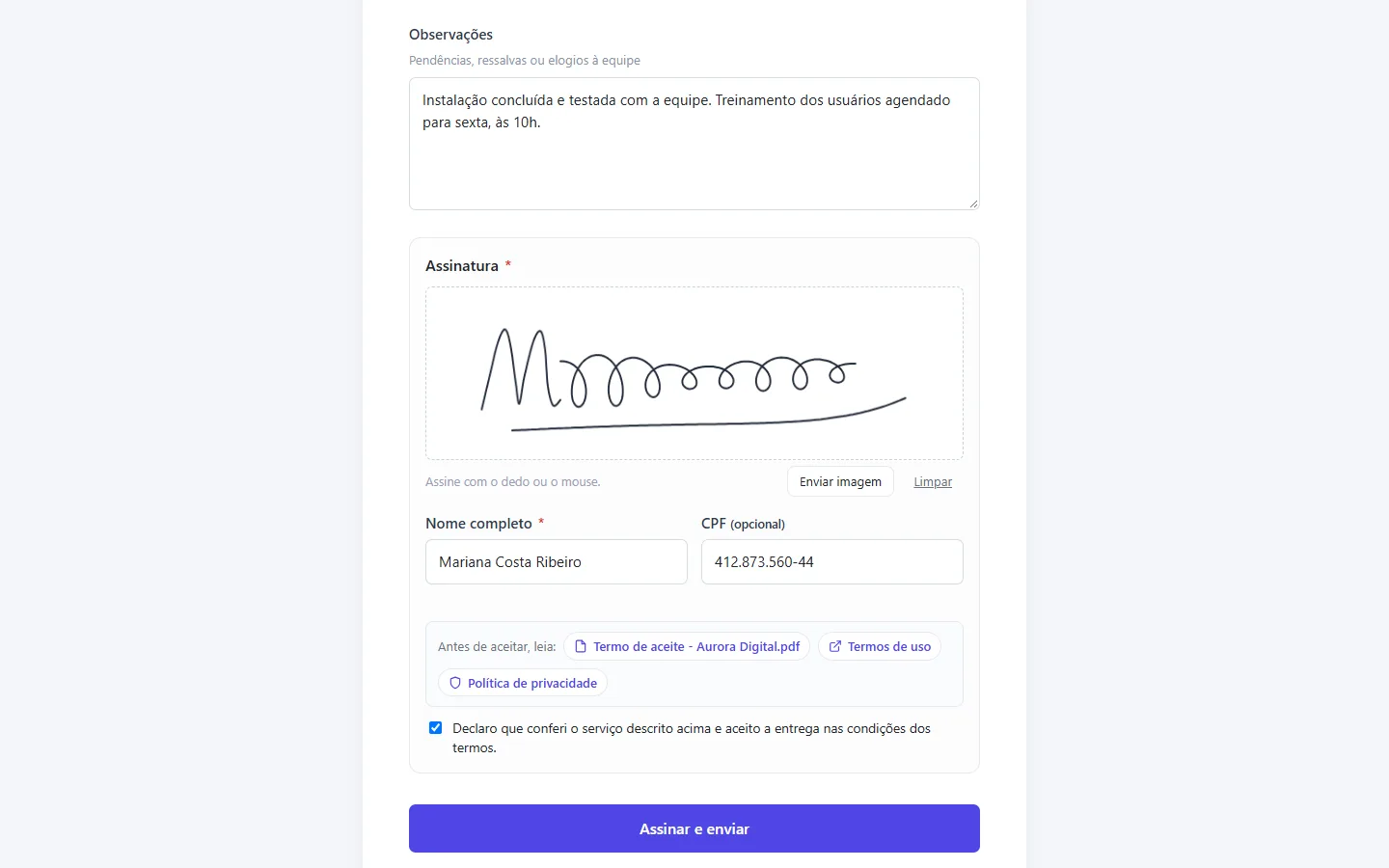
Every signature stays on the form, with the proof alongside
The submissions screen shows who filled it in, when and what they answered. On a signed submission, you get the signature image, the signer's details and the seal that checks the content is still the same.
- Evidence notifies the form's creator and the organization owner
- Form and submission files show up in My files
- Form preview before sending the link to someone
This lives alongside the rest of the operation
Task, schedule, ticket, goal, and conversation are the same database. What changes in one place shows up in the other, with nothing to export.
How to use forms to receive complete requests and collect signed acceptances
A form in Tasskee does two jobs: turning a request into a task or ticket that already has the information needed, and storing signed proof. Here's how to build each one and where people usually go wrong.
Step by step: a form that becomes a task
- Choose the destination. Define the project and the column where the submission will land: task, ticket or evidence (proof without a task).
- Build the fields. Text, choice, date, CPF (Brazilian tax ID), file or photo, signature and custom fields. Link each question to a task field so the information arrives in the right place, and use conditional logic to ask only what matters.
- Publish material alongside. A call for proposals, a manual or a photo of the sample stays on the form itself, so respondents see it before answering.
- Check the preview. See how the person will see it before sending the link.
- Generate one link per project. Each link has its own expiry and submission limit. You can turn one off without touching the others.
- Share it. Use the direct link or embed it on your own page.
Step by step: a form that becomes an acceptance
- Turn on the signature and choose the Evidence destination.
- Put the links to the terms and the contract PDF above the acceptance box.
- Whoever fills it in draws the signature on screen or uploads it as an image. The submission stores name, CPF, IP, date and time, and an integrity seal: if the response changes later, the screen warns you.
- The form's creator and the organization owner are notified on every submission.
Note: this is a simple electronic signature, which serves as proof of acceptance between the parties. It is not an ICP-Brasil certificate (Brazil's official digital certificate). If your contract requires that level, use the right tool for it.
Examples by type of company
Marketing agency
A briefing form, with questions about audience, tone and references and a file field for brand material, opens the task in the client's project already complete. At the end of the delivery, a second form collects the signed acceptance. To structure the questions, start from the project briefing template.
Technical service provider
The installation company uses an inspection form filled in on site, with photos and client data, and another for service acceptance signed on the phone screen at the end. The proofs are stored with the evidence alongside. See also the page on electronic security.
Law or accounting firm
The firm sends one link per client for collecting documents and data, and another for the service agreement. Each client gets their own link, with a submission limit, and the submission lands in their project. Collection no longer depends on email and "I didn't get the file".
Best practices and common mistakes
| Mistake | How to avoid it |
|---|---|
| A form that's too long | Use conditional logic and ask only what's necessary. |
| Fields not linked to the task | Map each question to a task field. |
| One link for all clients | Generate one per project, with its own expiry. |
| Acceptance without the terms in view | Put the links and the PDF above the acceptance box. |
| Not testing beforehand | Use the preview and make a test submission. |
Remember the limits: Start has 1 form and 100 submissions per month, Pro has 10 forms and 1,000 submissions, and Max has no limit.
When the form feeds customer service
A public intake form is the front door for tickets. If the request should trigger an action, like assigning it to someone or notifying an owner, automations take care of that.
An acceptance form, field by field
A lean delivery acceptance has: full name, CPF, email, a multiple-choice question (accepted, accepted with reservations, not accepted), a text field for the reservations and the signature. Above it, the summary of what was delivered, the link to the terms and the contract PDF. With conditional logic, the reservations field only appears when the person picks the second or third option. Done: the client answers in two minutes and you keep the proof.
For delivery with proof, start with the delivery acceptance form template, which comes with the suggested text and fields. For the client's initial request, the project briefing template organizes the questions. Forms start on the Start plan.
Questions about forms
Does the person filling it in need a Tasskee account?
Can I use the same form for several clients?
Is the signature legally valid?
What is the Evidence destination?
Do the form fields become task fields?
Can I put the form on my website?
Stop receiving half-finished requests
Build the form in minutes, send the link and watch the next request land on the board ready to go — or the next sign-off arrive signed.