

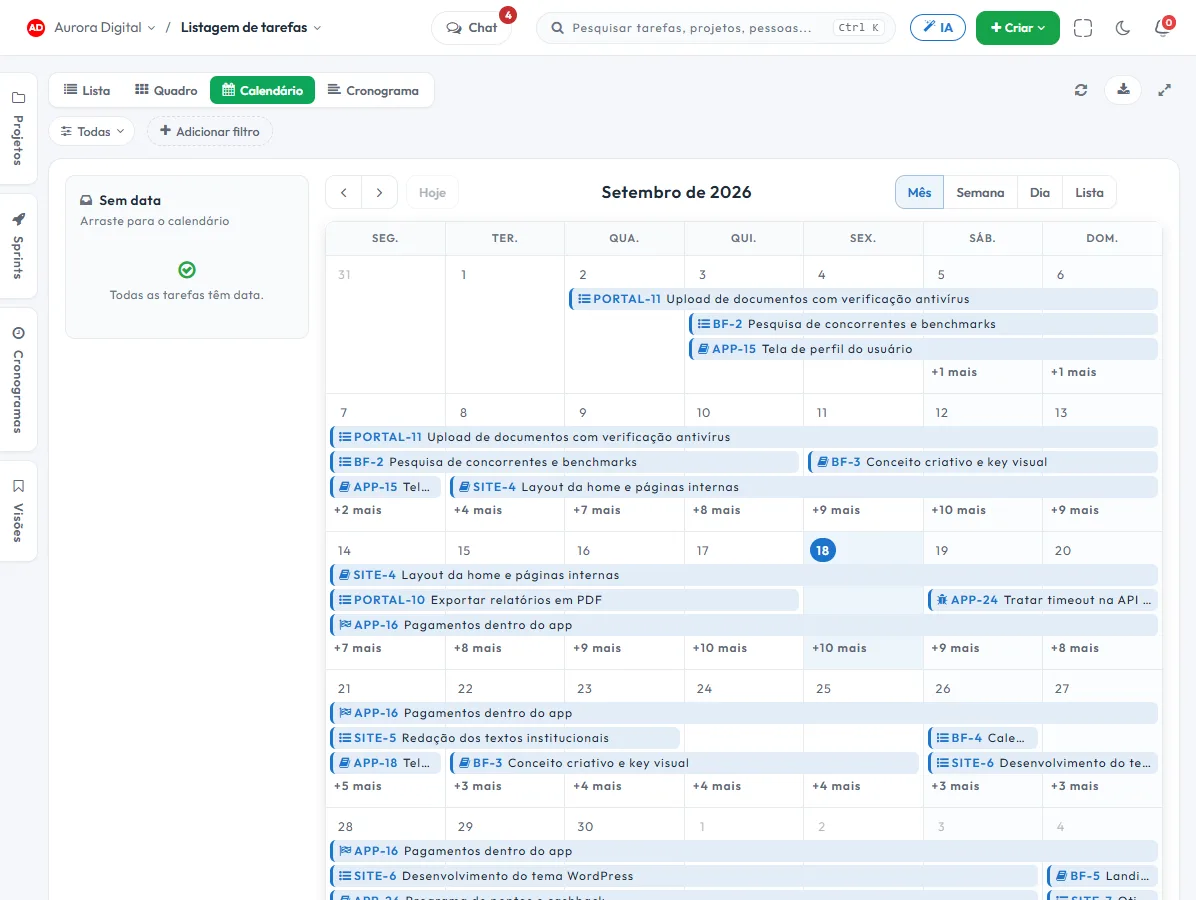
The team's deadlines on a single calendar.
Each task appears on its due date. By month, week or day, you see the real load on the calendar and drag the task to another date when the plan changes.
The week before it happens
List and board show what exists; the calendar shows when. It is where too many promises on the same Friday become obvious.
Month, week and day
Choose the calendar zoom: month to plan, week to agree, day to execute.
Drag to postpone
Priority changed? Drag the task to another day and the due date is updated in every other view.
No date, by hand
Tasks not yet scheduled sit alongside, waiting for a slot on the calendar instead of vanishing at the bottom of the list.
Filter by person
See the calendar of a person, a team or a project before promising one more delivery for the same week.
From calendar to board, without switching tools
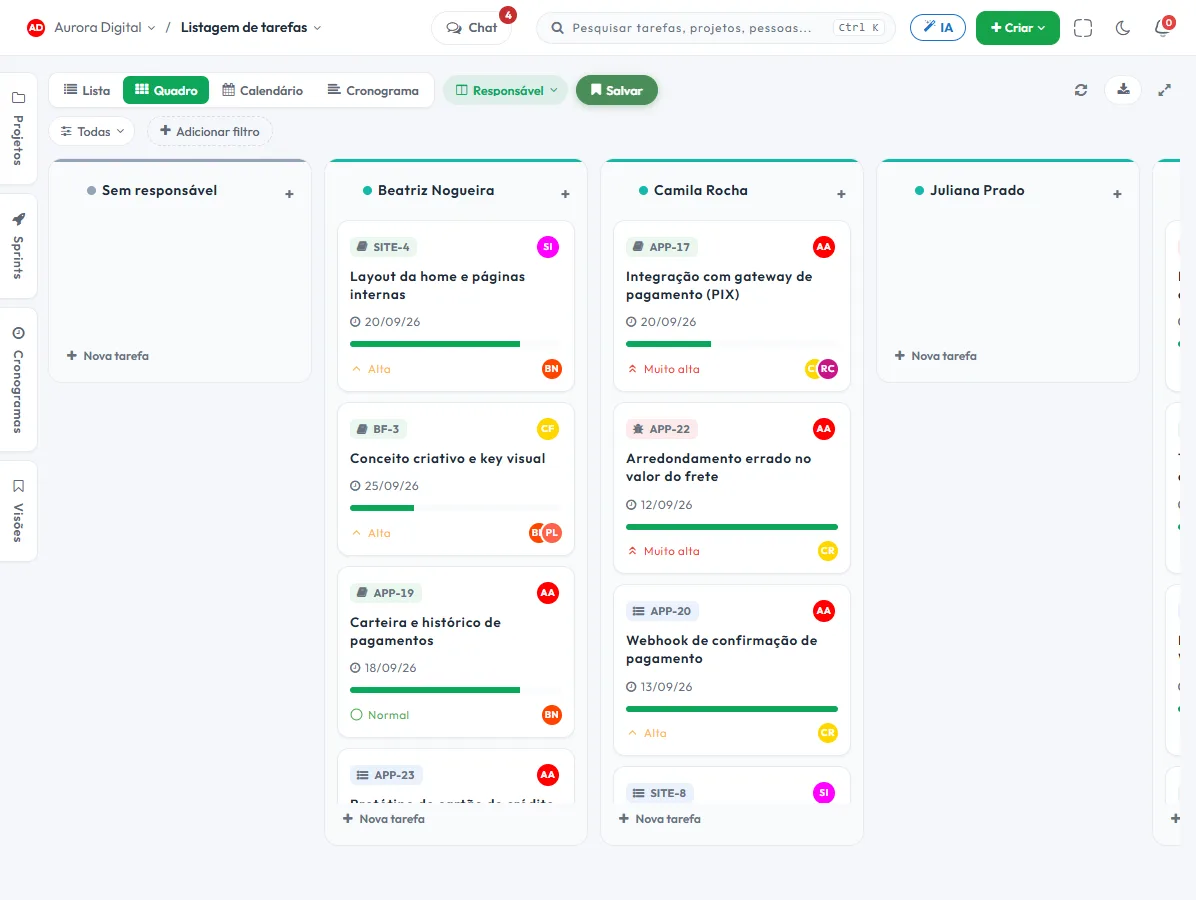
When the question stops being "when" and becomes "where do things stand", the same set of tasks becomes a board, with the swimlanes you prefer.
- Board by status, assignee, priority or sprint
- Filters saved in a view, to return to with one click
- A date change made in the calendar already shows up on the board and in the schedule
- The daily planner gathers what is yours for today, across all projects
This lives alongside the rest of the operation
Task, schedule, ticket, goal, and conversation are the same database. What changes in one place shows up in the other, with nothing to export.
How to use the task calendar so you don't promise more than the week can hold
Tasskee's calendar isn't a meeting scheduler. It's the view of tasks by due date. It serves one very specific question: do too many people have deliveries on the same Friday? Here's a playbook for using it as a planning tool, not just for lookups.
Step by step
- Make sure tasks have due dates. A task appears on the calendar on its due date. Those without a date wait on the side for a slot, and make up your decision queue.
- Start with the month. At the start of the month, look at the monthly view to spot peaks: three big deliveries in the same week call for a conversation before the problem arrives.
- Drill down to the week on Monday. Agree on what each person delivers by Friday. Filter by assignee and compare the load across people.
- Use the day to execute. The daily view shows what's due today. Each person also has the day planner, which gathers their tasks across all projects.
- Drag to postpone with judgment. Priority changed? Pull the task to another day. The change is recorded in the history, with who changed it and when, and applies on the board, the list and the schedule.
- Save the view. "Team deliveries" or "Due this week" come back with one click.
Examples by type of company
Accounting firm
Each obligation has a fixed deadline in the month. The firm keeps recurring tasks per client and looks at the monthly calendar to see the peak days, close to the due dates. Whoever has the heaviest load that week gets help beforehand, not afterward. For how to design recurrences, read recurring tasks. The page for accounting firms has more examples.
Technical service provider
A security-systems maintenance company schedules visits as tasks, with a date and an assignee. On the weekly calendar, the coordinator sees whether two technicians were scheduled on the same day for distant clients and redistributes. Visits without a date stay on the side as a to-do list to fit in.
Marketing agency
The agency uses the calendar as an editorial calendar: each post, email or campaign is a task with a publication date. The manager filters by client and checks that the month is balanced. When a client postpones an approval, they drag the tasks tied to the same deliverable to the new date.
Calendar, board or schedule?
| Question | View |
|---|---|
| When is each thing due? | Calendar |
| What stage is it in? | Kanban board |
| What depends on what? | Schedule |
| What fits in this cycle? | Sprints |
Best practices and common mistakes
- A due date is a commitment, not a wish. If every card is due on Friday, nobody knows what's urgent.
- Avoid leaving everything undated: what has no due date doesn't show up on the calendar and disappears.
- Respect permissions: each person's calendar is visible according to the viewer's profile.
- Don't use the calendar as a list of meetings. It exists for work deadlines.
- The calendar is Tasskee's task calendar, inside the system. To take due dates to other systems, there's the REST API and webhooks, starting on the Start plan.
The weekly rhythm
A simple agreement works well: on Monday, 15 minutes looking at the week on the calendar, filtered by team; on Wednesday, a check for overdue items; on Friday, a look at the following week before heading out. Three short looks prevent most surprises, and cost less than a status meeting.
An example of a tight week
Imagine a team of four with seven deliveries scheduled for Thursday. On the weekly calendar, filtered by assignee, it's clear that one person has four of them and another only one. In two drags, the manager moves the due date of two tasks to Friday and talks to the client about the adjustment, before anything slips. Without that view, the problem would only show up on Thursday at five in the afternoon.
If your work is full of monthly, weekly or quarterly repetition, the post recurring tasks shows how to let Tasskee create those tasks for you and how the calendar reflects them. The Calendar view is part of the Pro plan; the day planner is on every plan.
Questions about the calendar
Does the calendar sync with Google Calendar?
Can I see everyone's calendar?
Does dragging on the calendar really change the due date?
See your week before promising the next one
Create a free account and put the team's deadlines on a single calendar.