

Project management and scheduling for engineering and construction.
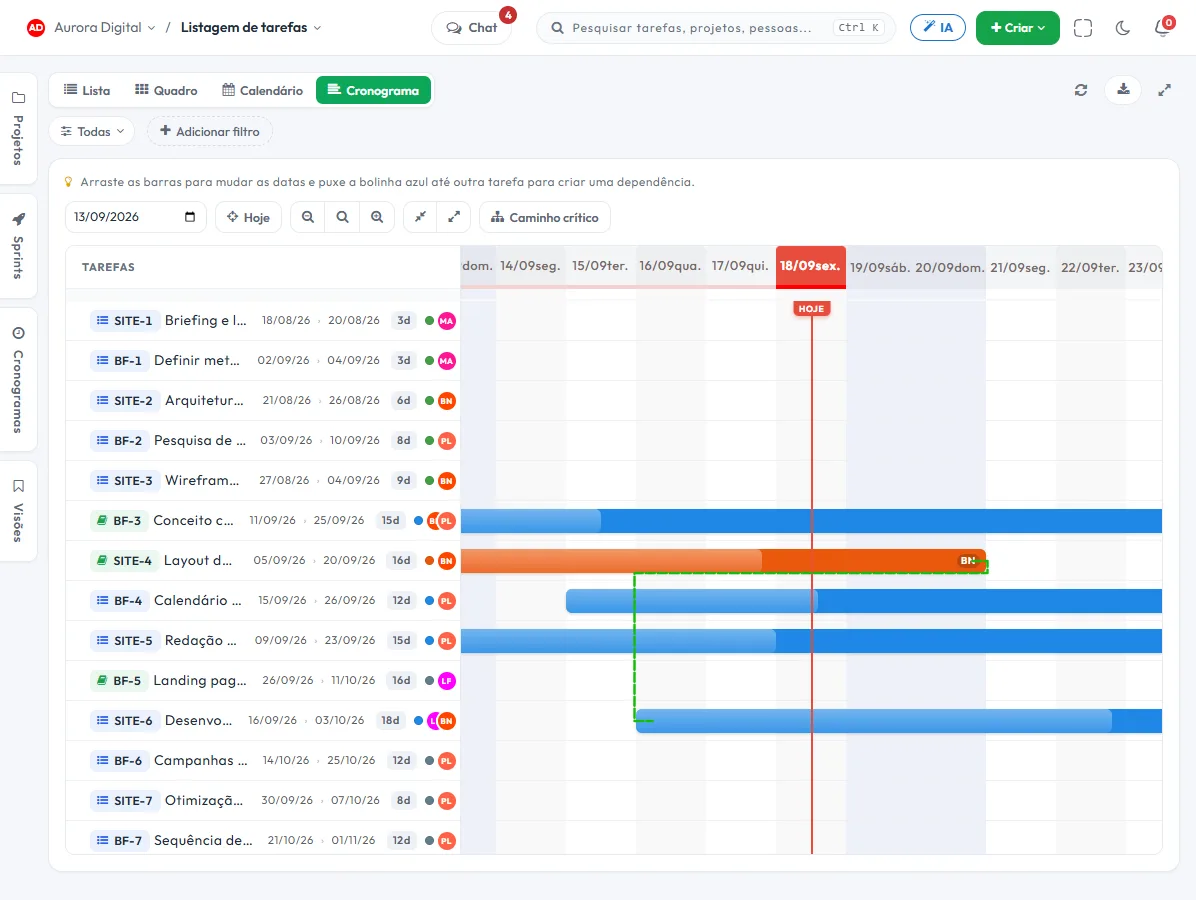
Each job is a project, each phase is a workstream, and the schedule has real dependencies: if the foundation slips, the delivery date moves on its own. At the end, sign-off is signed, with a photo, and the post-construction ticket lands in the same job record.
The day-to-day you recognize
Construction jobs rarely run late for lack of technical skill. They run late because one phase was waiting on another and nobody could see the queue.
The phase that was waiting on another
Masonry can't start until the structure is cleared, but that only becomes a problem the day the crew shows up and can't work.
The schedule is in last week's PDF
The material delivery date changed, the sequence changed, and the document the client has is already out of date. The meeting starts with a verbal update.
Delivery without proof
The work was done, and the client says a finish was missing. Without a photo from that day and without a signature, it's your word against theirs, and the payment measurement waits.
After the job, the engineer's phone keeps ringing
A leak, a latch, a loose floor tile. The client calls directly, the request isn't logged, and nobody knows how many times the crew went back for free.
Each job becomes a project, with Site and Design as workstreams
Choose the Engineering template at signup and the board is created with Backlog, In progress, Inspection, In approval and Done, plus the Design and Site workstreams. Then you add the phases for your type of job.
- 1 Project per job"Aurora Building Renovation · Florianópolis". Contract, tasks, photos, comments and client tickets in one place, from kickoff to warranty.
- 2 One workstream per phaseFoundation, Structure, Masonry, Utilities, Finishing. The list groups by workstream and the filter isolates the phase, so what's finished and what hasn't started yet is easy to see.
- 3 Dependencies and critical pathThe schedule links the phases and highlights the critical path. When a phase slips, the following ones move and you see the effect on the end date before you promise anything.
- 4 Inspection before sign-offThe task goes through Inspection and In approval before it's completed. Who inspected, who approved and when are recorded in the history.
What closes out delivery and post-construction
Three features that cover what usually gets left over at the end: proof, follow-up and warranty.
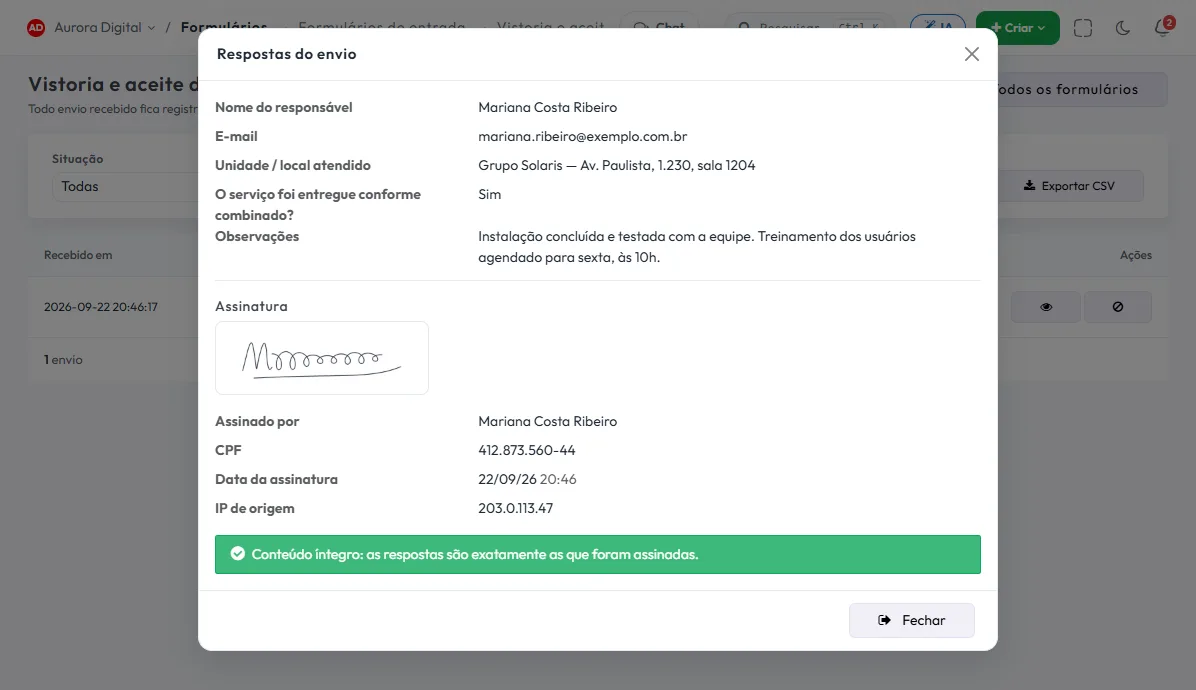
Signed sign-off, with photo
The handover form opens in the phone's browser: the crew attaches the photos and the client signs on the screen. It's stored with name, IP, date, time and the SHA-256 hash of the answers. It's a simple electronic signature, not ICP-Brasil.
Post-construction ticket with a due date
The client's request becomes a ticket with priority and due date, inside the job's project. The public submission form receives the request without the client needing to log in.
The client follows along without becoming a user
The guest portal shows the schedule and deliverables of their project, with comments and approval, without taking up a seat.
The features that support this day to day
Task, schedule, ticket, form, and conversation are the same database. What changes in one place shows up in the other, with nothing to export.
Questions from people who run construction jobs
Is Tasskee a construction ERP?
Does the schedule support dependencies between phases?
Can I record sign-off with a photo and a signature?
Does the field crew need to install an app?
Does it work for contractors and small renovations?
Start with the job that depends most on its date
Create your account, open the job's project, set up the phases and link the dependencies. In one afternoon you'll see the end date move.