

Deliver in short cycles and predictable.
The team chooses what fits in the two-week cycle, tracks it on the board and, at the end, sees what it delivered. The next promise stops being a guess and becomes arithmetic.
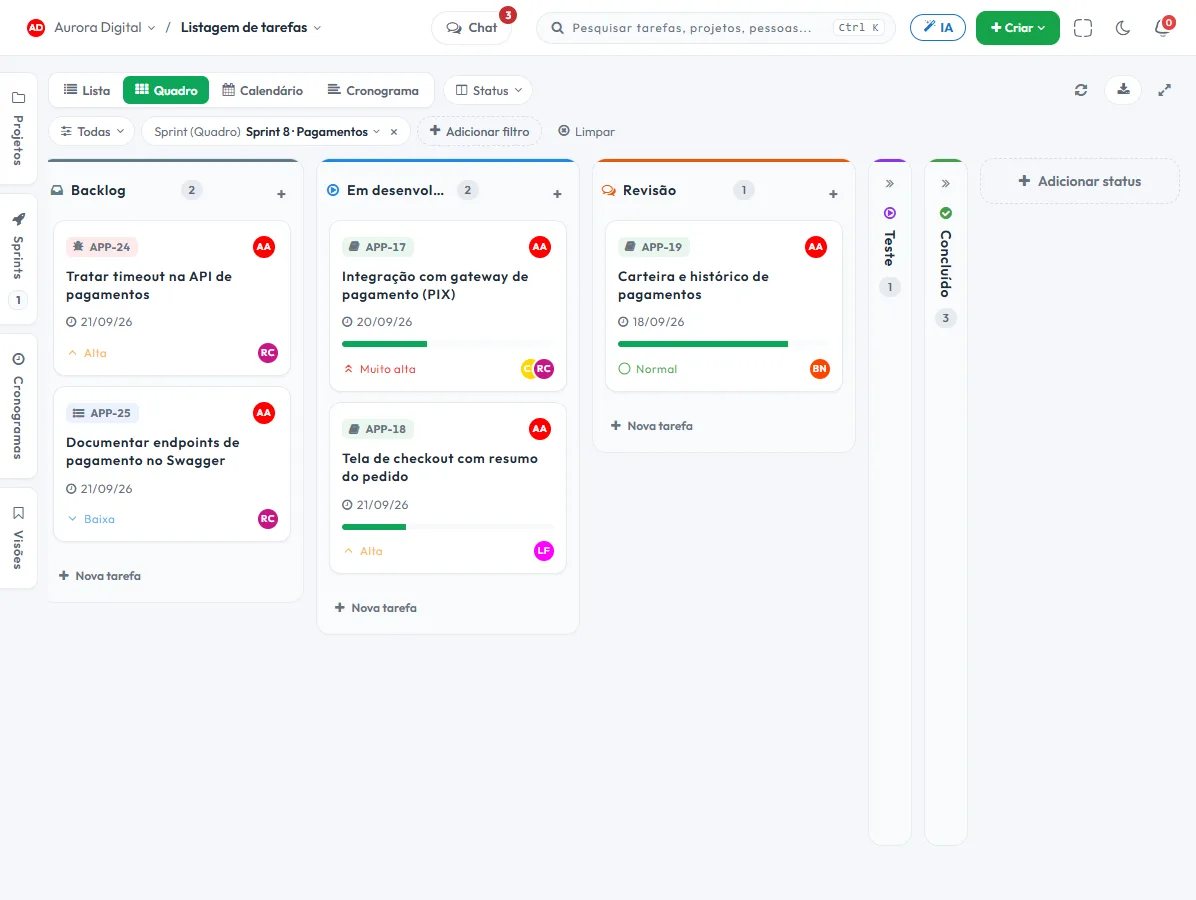
From backlog to delivered
A well-closed cycle answers three questions: what goes in, how it is going and how much the team really delivers.
Cycle planning
Pull from the backlog what fits in the sprint, with an estimate and assignee, and lock the scope with everyone watching.
Daily burndown
Midweek you can already tell whether there will be enough time, instead of finding out the day before delivery. Filter the sprint in the task list and the Burndown view shows the cycle with the projected finish.
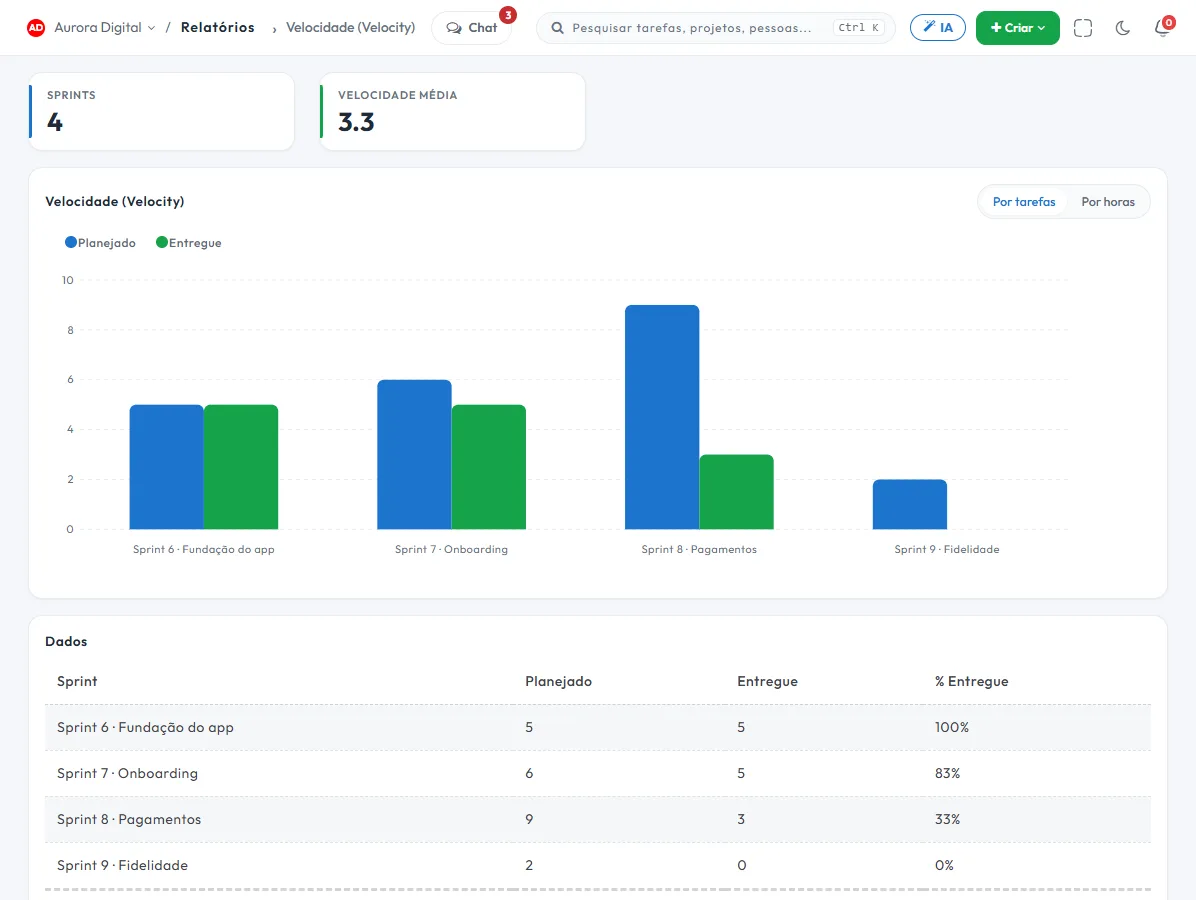
Real velocity
The average of previous cycles becomes the baseline for the next plan. Less optimism, more history.
One sprint, several projects
The same cycle can bring together tasks from different projects, which is how most teams really work.
At the end of the sprint, the numbers explain what happened
Sprint report, cumulative flow, lead time and cycle time show where work gets stuck — usually in a review queue nobody was watching.
- Sprint report: planned, completed and what went back to the backlog
- Lead time and cycle time: how long a task takes and where it stops
- Cumulative flow to spot buildup before it becomes delay
- Estimated vs. actual, when the team logs hours
This lives alongside the rest of the operation
Task, schedule, ticket, goal, and conversation are the same database. What changes in one place shows up in the other, with nothing to export.
How to plan and close a sprint in practice, without too much ceremony
A sprint is a cycle with a start, an end and an agreed scope. You don't need full Scrum for it to work. The gain comes from two things: no longer promising more than the team delivers, and knowing, mid-cycle, whether you'll make it. Here's how to run this in Tasskee.
Step by step for a two-week cycle
- Keep the backlog in order. Tasks not yet planned stay in the project, prioritized. Whoever decides priority is the product owner or the department head.
- Create the sprint with dates. Set a start and an end. Two weeks is a good starting point for most teams.
- Plan by pulling from the backlog. The team chooses what fits, with an estimate and an assignee. Use the velocity of previous cycles as a yardstick: if the team closed 30 points on average, don't pull 50.
- Track it on the board. The Kanban board grouped by sprint shows the cycle in progress. The short daily meeting looks only at what's blocked.
- Read the burndown mid-cycle. If the actual line is above the ideal on the Wednesday of the second week, there's still time to cut scope or ask for help.
- Close the sprint and look at the report. What wasn't finished goes back to the backlog and counts toward the next planning. The report shows planned, completed and what went back.
Examples by type of company
Agency with creative and media teams
A small agency works in two-week cycles with tasks from several clients in the same sprint, something Tasskee allows because a cycle can bring together tasks from different projects. On Monday, the team picks the deliverables and reports for the fortnight; on the Friday of the second week, it sees what closed. The conversation with clients shifts from "when will it be ready?" to "what goes into this cycle?". For the view from outside tech, read sprints outside IT.
Software house
A software house uses the cycle in the classic format: backlog estimated in points, planning on Monday, daily burndown, report at the retrospective. Lead time and cycle time show where the task stops, almost always in a review queue nobody was watching. See the page for software houses.
Law or accounting firm
Non-tech teams benefit too. A firm defines a fortnightly cycle for internal deliverables and pieces of work: contract reviews, reconciliations, client reports. No Scrum ceremony, just the cycle and a closing conversation. What wasn't finished goes back in the queue, with the reason commented.
What to look at in the numbers
| Indicator | What it answers |
|---|---|
| Burndown | Is the remaining work falling at the required pace? |
| Velocity | How much does the team complete, on average, per cycle? |
| Lead time and cycle time | How long does a task take and where does it sit idle? |
| Cumulative flow | Is work piling up in a stage before it becomes late? |
| Estimated vs. actual | Do the estimates match the logged hours? |
Best practices and common mistakes
- Don't change the scope mid-cycle without taking something out. An urgent item came in, a task goes out.
- With two or three closed sprints, velocity is already good enough to size the next one. Before that, estimate with some slack.
- Avoid sprints that turn into wish lists: completing 80% of what was agreed is worth more than promising 100% and delivering 50%.
- Don't use the burndown to hold people accountable. It exists to decide early, not to blame anyone.
- A task that's too big doesn't fit: break it into subtasks before pulling it in.
Sprint, schedule and goals
The sprint takes care of the week; the schedule takes care of the long term. If the cycle serves a bigger objective, link the tasks to goals and track the result without a parallel spreadsheet.
The closing conversation
At the end of the cycle, gather the team for twenty minutes with the sprint report on screen. Three questions are enough: what did we deliver, what was left behind and why, and what do we change in the next cycle. Write down a single improvement and test it in the following sprint. Teams that try to fix five things at once end up fixing none. Over time, the velocity and lead time history shows whether the change worked.
For the concepts of roles, ceremonies and artifacts, read the Scrum guide. To start with a ready-made backlog and cycle structure, use the backlog and sprint template. Sprints are part of the Pro plan, unlocked during the 15-day trial.
Questions about sprints
Do I need to do Scrum to use sprints?
What happens to what wasn't finished?
Can I have tasks from several projects in the same sprint?
How is velocity calculated?
Close your next cycle with numbers, not guesswork
Open a sprint, pull in what fits and track the burndown from day one.