
Simple on day one.
Complete when you need it.
Projects, tasks, schedule, tickets, goals, documents, and your customers' WhatsApp support, all in one tool. Your team gets it without training. Your operation grows without switching systems.
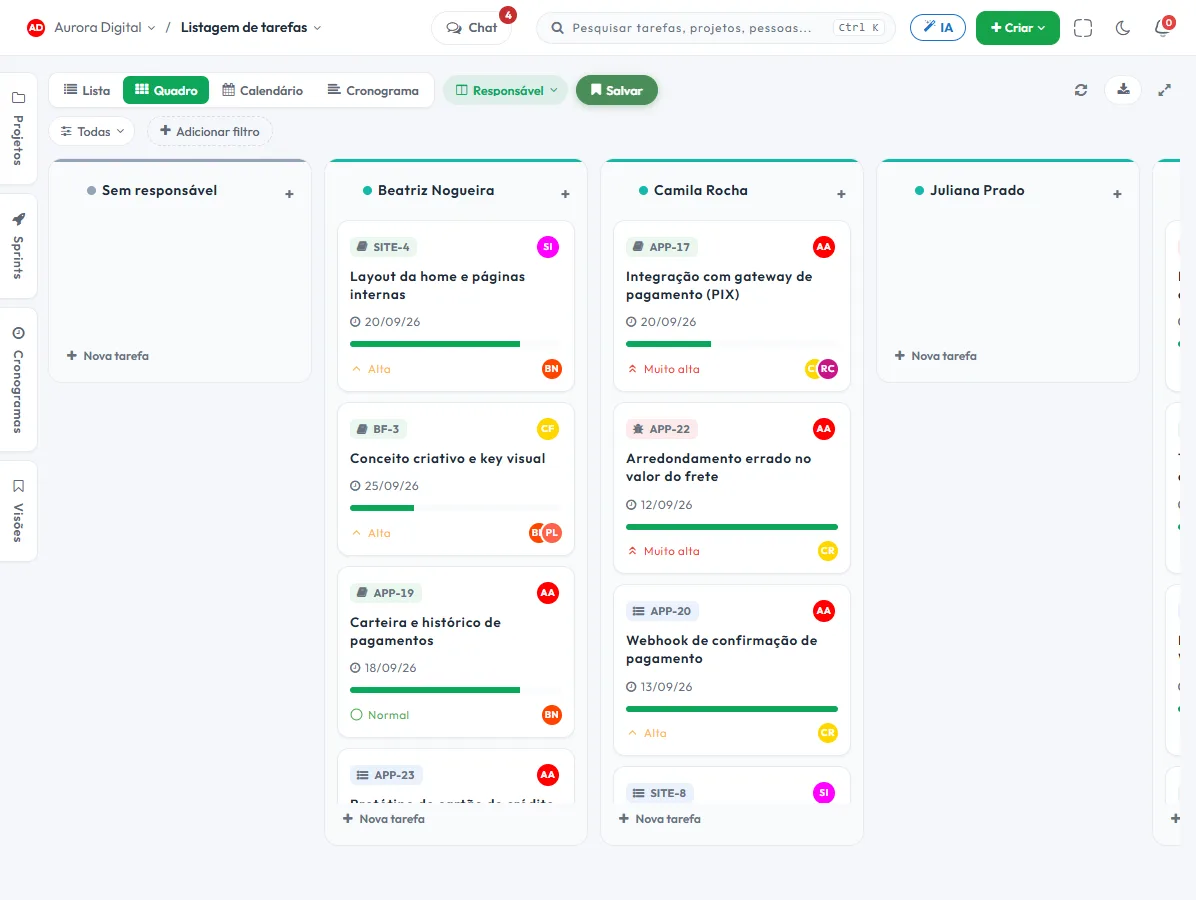

Your team starts using it today. No manual, no consultants.
A full-featured tool usually charges you in complexity. Tasskee hides the weight behind clean screens and shortcuts anyone can discover on their own.
One Create button, on any screen
Task, ticket, project, or document: the green button at the top creates it without leaving where you are.
Everything in one Ctrl K
A single search finds tasks, projects, and people. No one has to memorize where things live.
Ask in plain language
"Create a review task for tomorrow." The AI assistant does it and asks for confirmation on anything that can't be undone.
The same task, four ways to see it
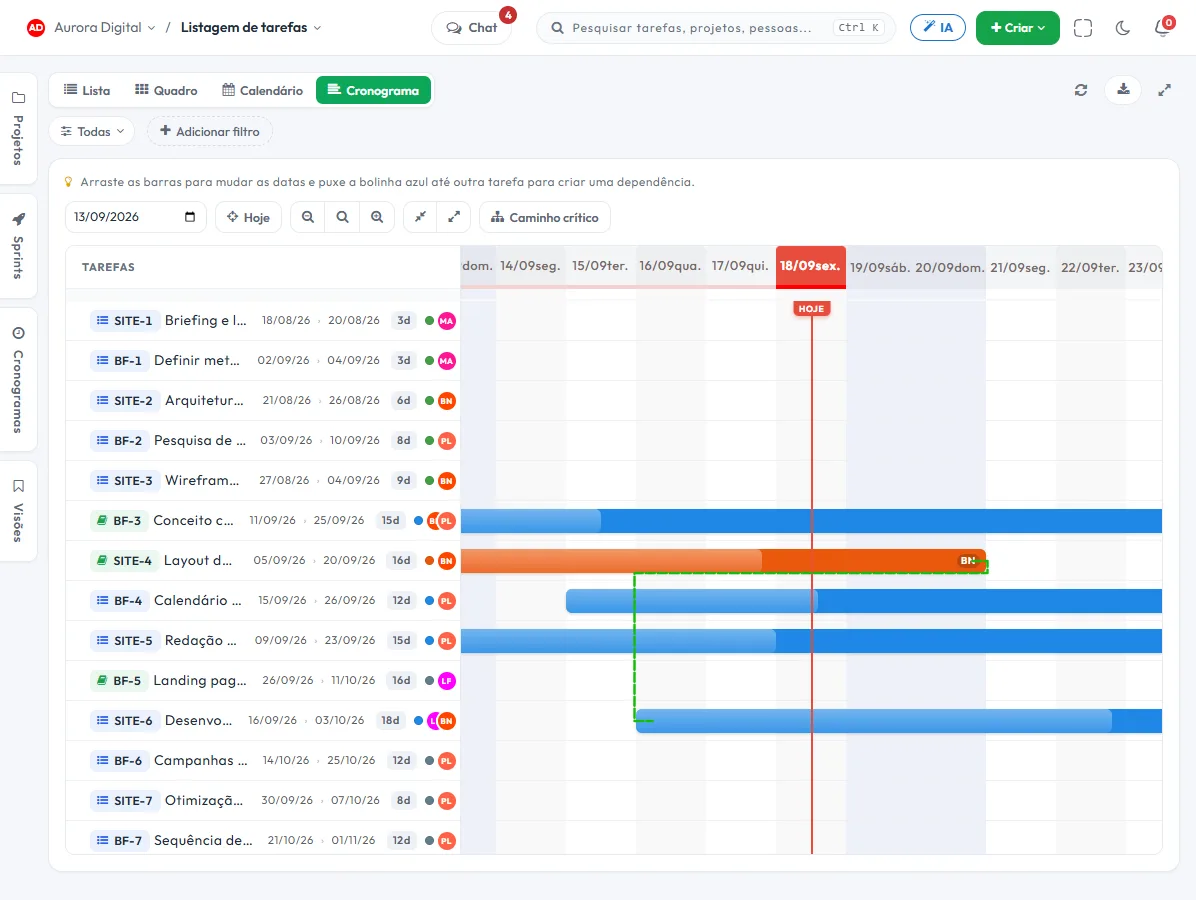
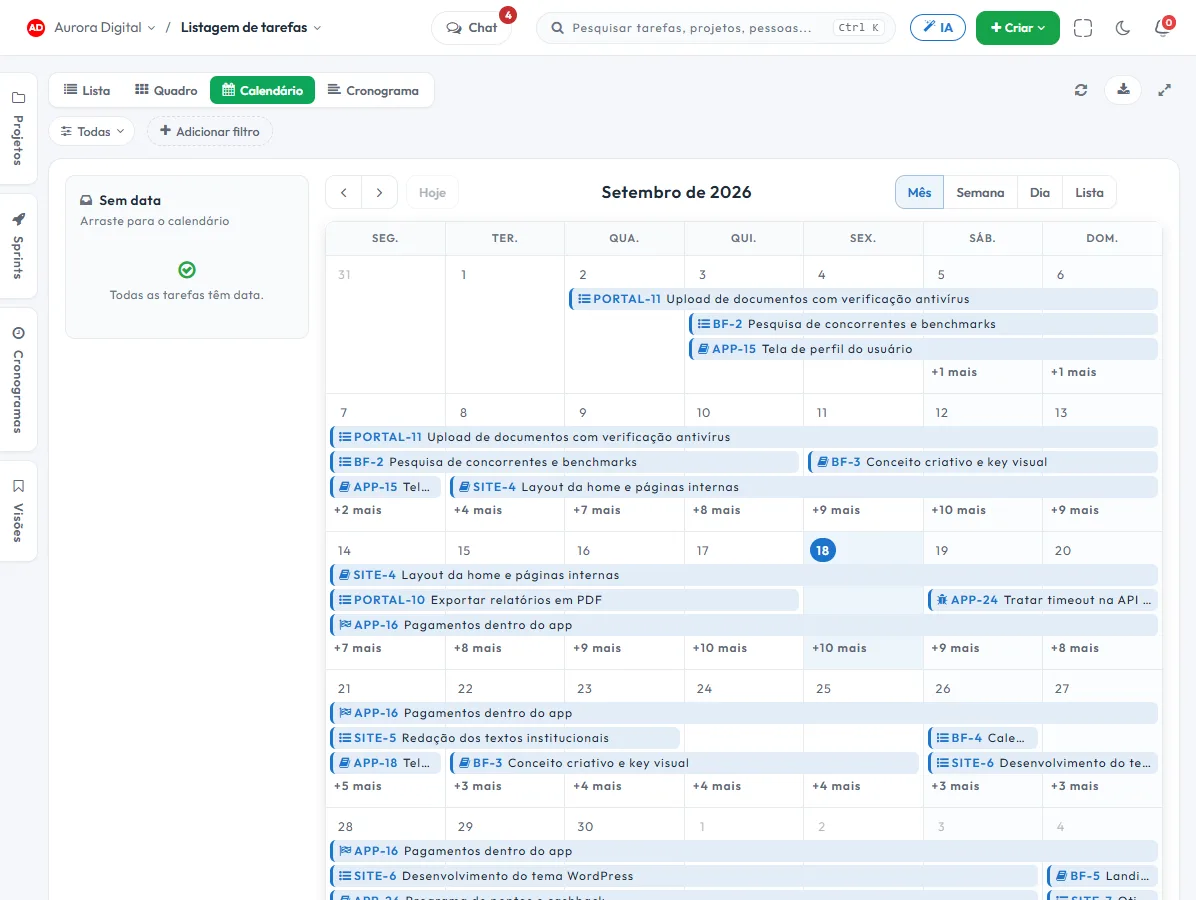
List, board, calendar and schedule show the same data. Switching views doesn't mean rework.
Your day, already planned
The daily planner pulls everything that's yours, from every project, into a single list. You open it and know where to start.
Everyone sees what they should see
Permission profiles, guest portal, and change log. You can open the tool to the client without worry.
Complete, without looking complicated
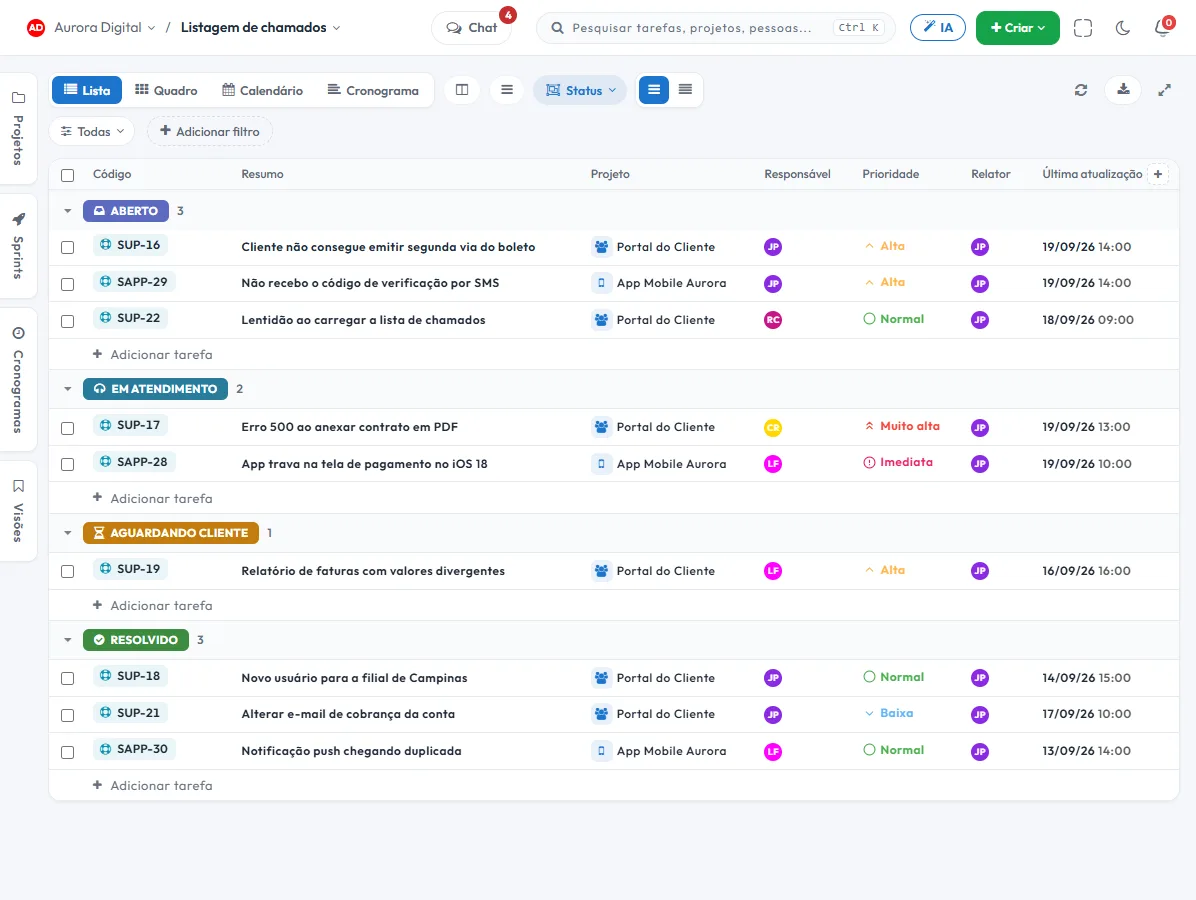
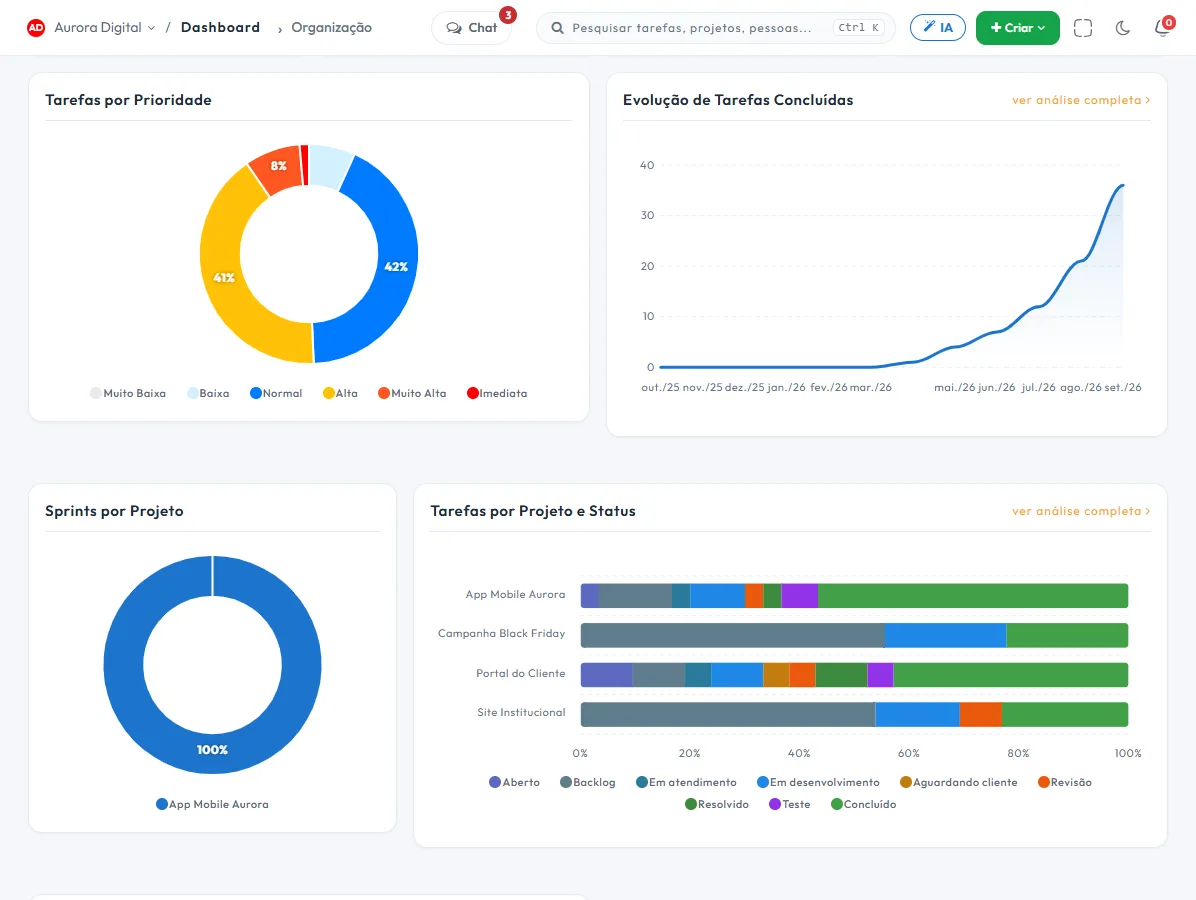
These are real screens from the product. Everything you see here is in the Pro plan, and in the free trial.
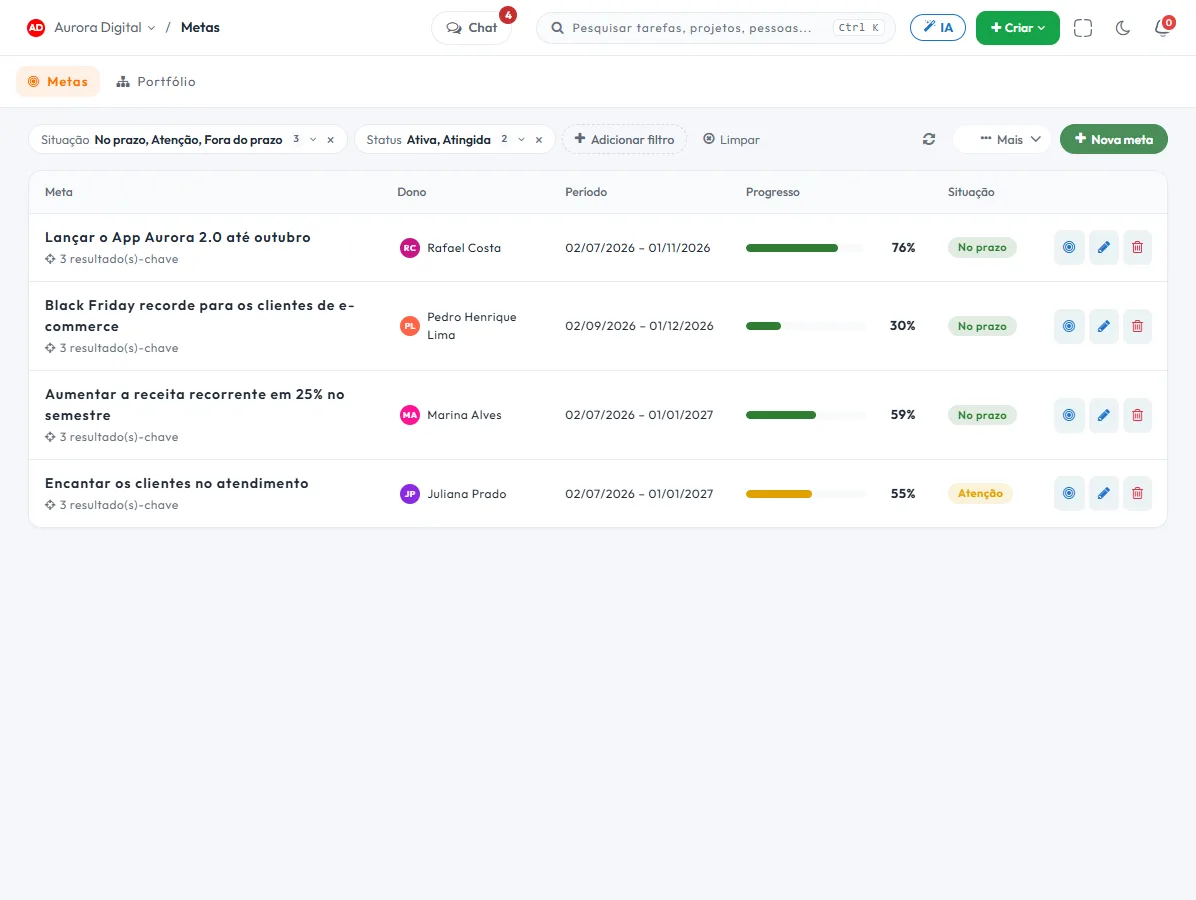
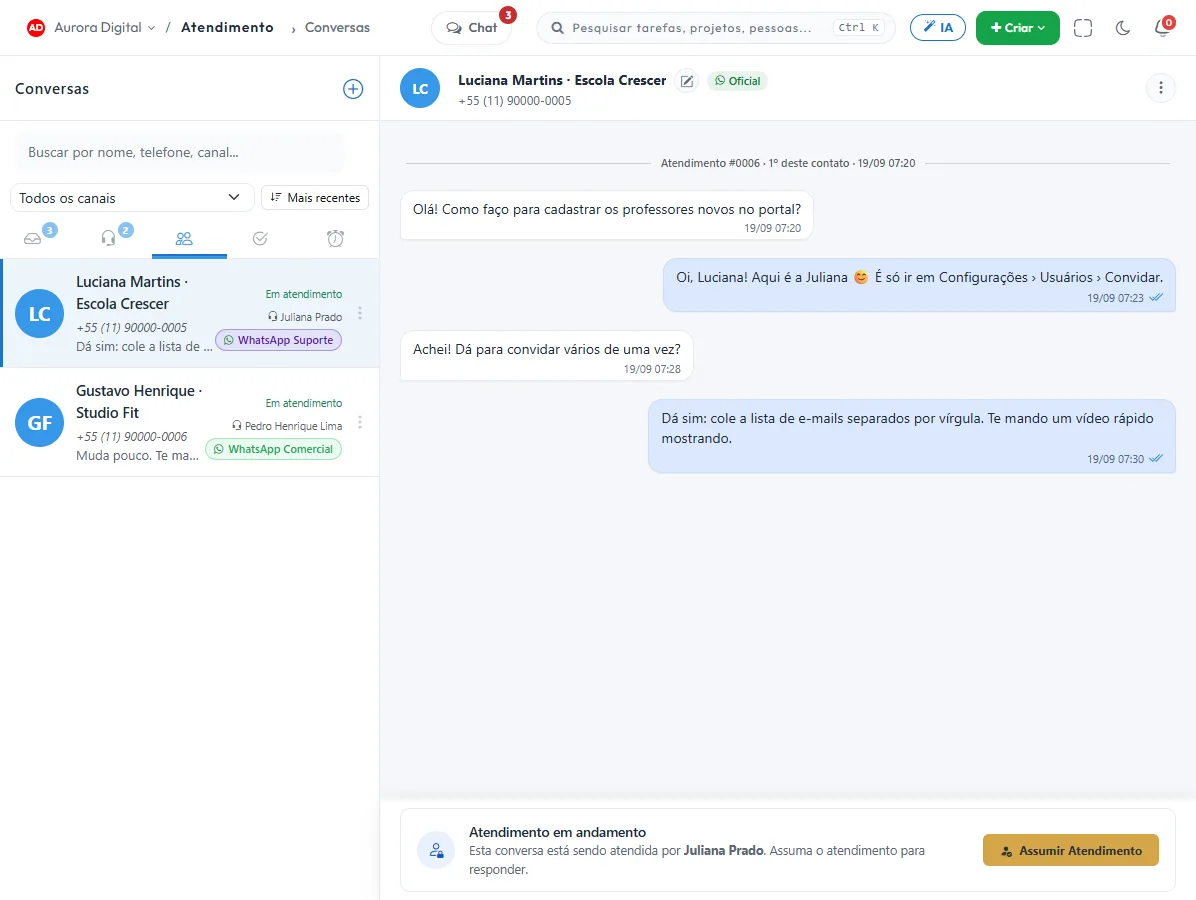
The customer messages on WhatsApp. The team resolves it in the same place.
Project tools stop where the customer begins. In Tasskee, the conversation becomes a ticket or task with one click, and the reply goes back to the WhatsApp it came from.
- AI agent, 24 hoursIt answers with what you taught it, handles follow-ups on its own, and hands off to a person when needed.
- Organized team, shared numberQueues per team, transfer, internal notes, templates and quick replies.
- Measured end to endSLA with alerts, satisfaction survey, and customer service dashboard.
Add-on from R$ 69 per channel/month. The trial applies to any plan, including Free.
An AI that knows your operation and doesn't get creative.
The assistant reads your projects, goals and tickets, answers and acts. Everything it changes is recorded, and anything irreversible waits for your okay.
The AI audit log shows every action, and the AI respects the permissions of whoever asked.
New Project specs maintained by your AI agent via MCP — and the manager tracks progress.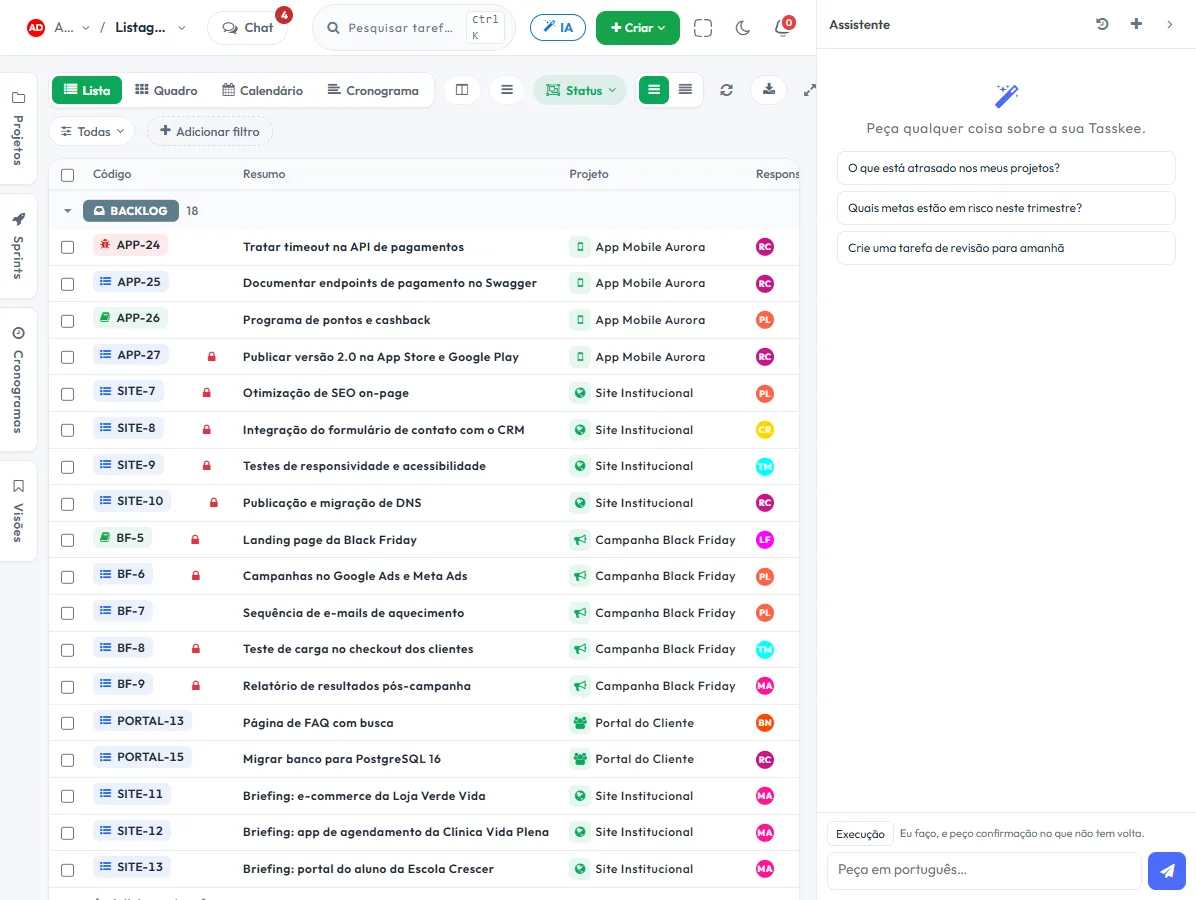
Pay the real price of AI, not someone else's credits.
Many tools sell AI in credits, with markup in the price and a balance that runs out mid-month. In Tasskee you connect your provider's key and pay for usage directly to them. It's the same assistant, costing far less.
The most common model in other tools.
- A markup built into the price of every AI reply.
- Monthly package paid in advance, with credit that expires if unused.
- The balance runs out mid-month and the AI stops until you buy more.
- You don't choose the model or see what each use really cost.
You connect your OpenAI, Gemini, or Claude key.
- The provider's list price. Usage is paid directly to them, with no markup from us.
- Pay only for what you use. No credit packs and no balance that expires.
- A model per role. A light, cheap model for summarizing, a stronger one for turning documents into tasks.
- Costs under your control. Spending limit and usage report in the provider's own dashboard.
With lightweight models, everyday tasks like summarizing comments or suggesting subtasks usually cost fractions of a cent. The key is stored encrypted.
The context lives on the task. Not in ten tabs.
Document, client conversation, comment, attachment and history stay attached to the task. Whoever arrives later understands everything without asking.
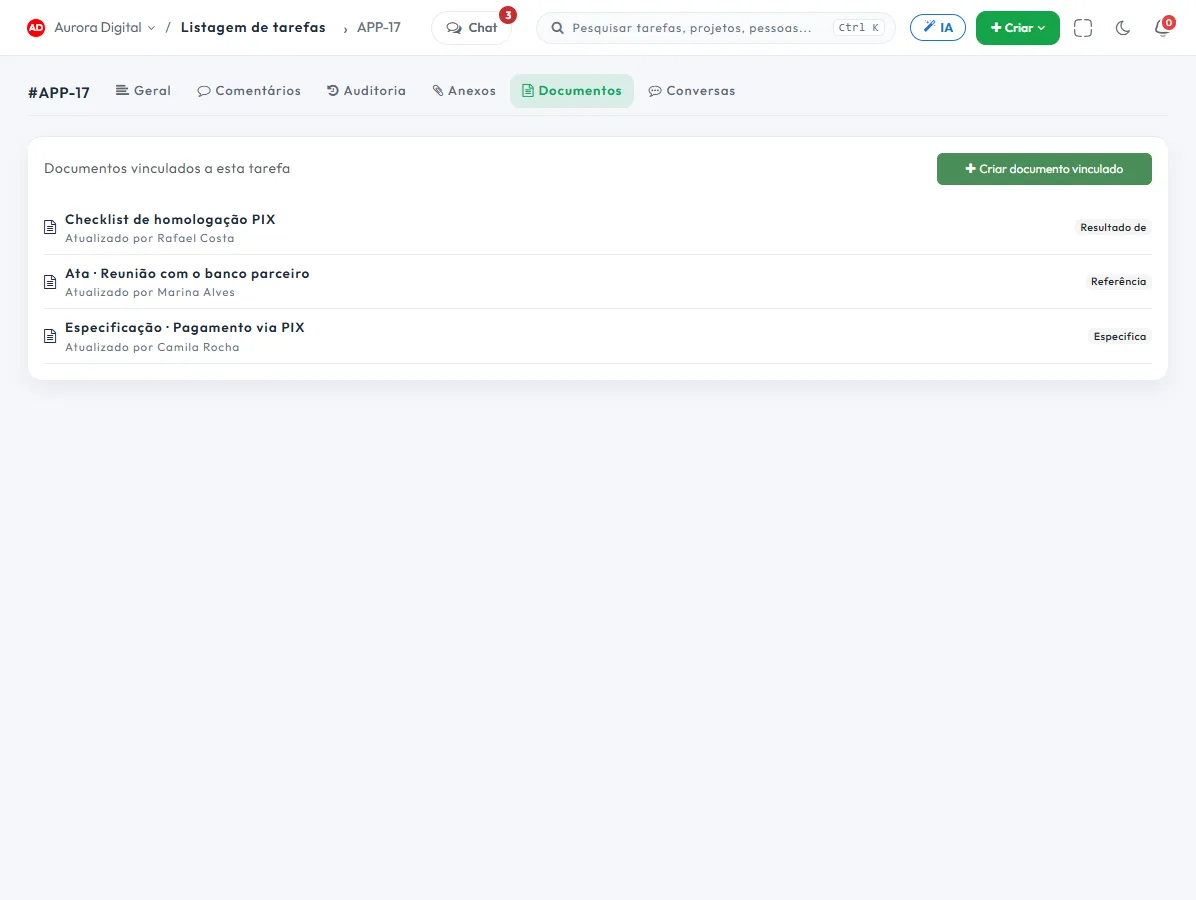
Linked documents, with versions
Specs, minutes and checklists next to the task. Sharing by person or by public link, and version history.
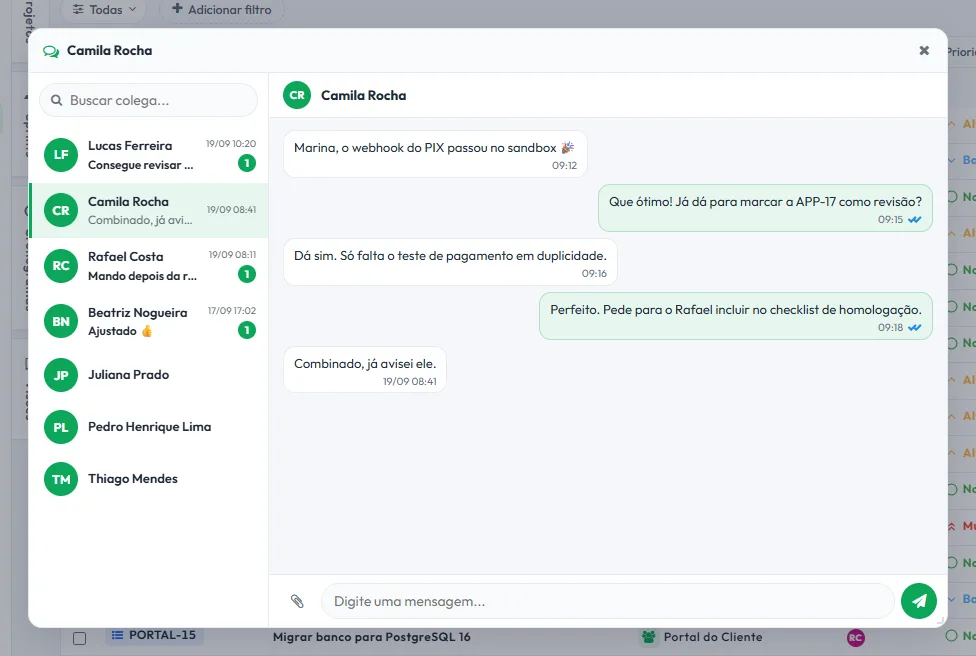
Team chat that knows which task you mean
A floating window on any screen, one-on-one or in a group, with @mentions. With a task open, the conversation with your teammate is stamped with it.
Every team has a suspicion. Few can measure it.
Tasskee keeps every status change, with date and author. That's what lets you say, in days, where the process loses time — and not just where the task is stuck today.
The bottleneck is written out, not drawn.
Instead of one more chart for you to interpret in the meeting, a ready-made sentence: which stage consumes how much of the cycle, with the median and P85 alongside.
Tasks and tickets on the same dashboard, together or separate.
See how it works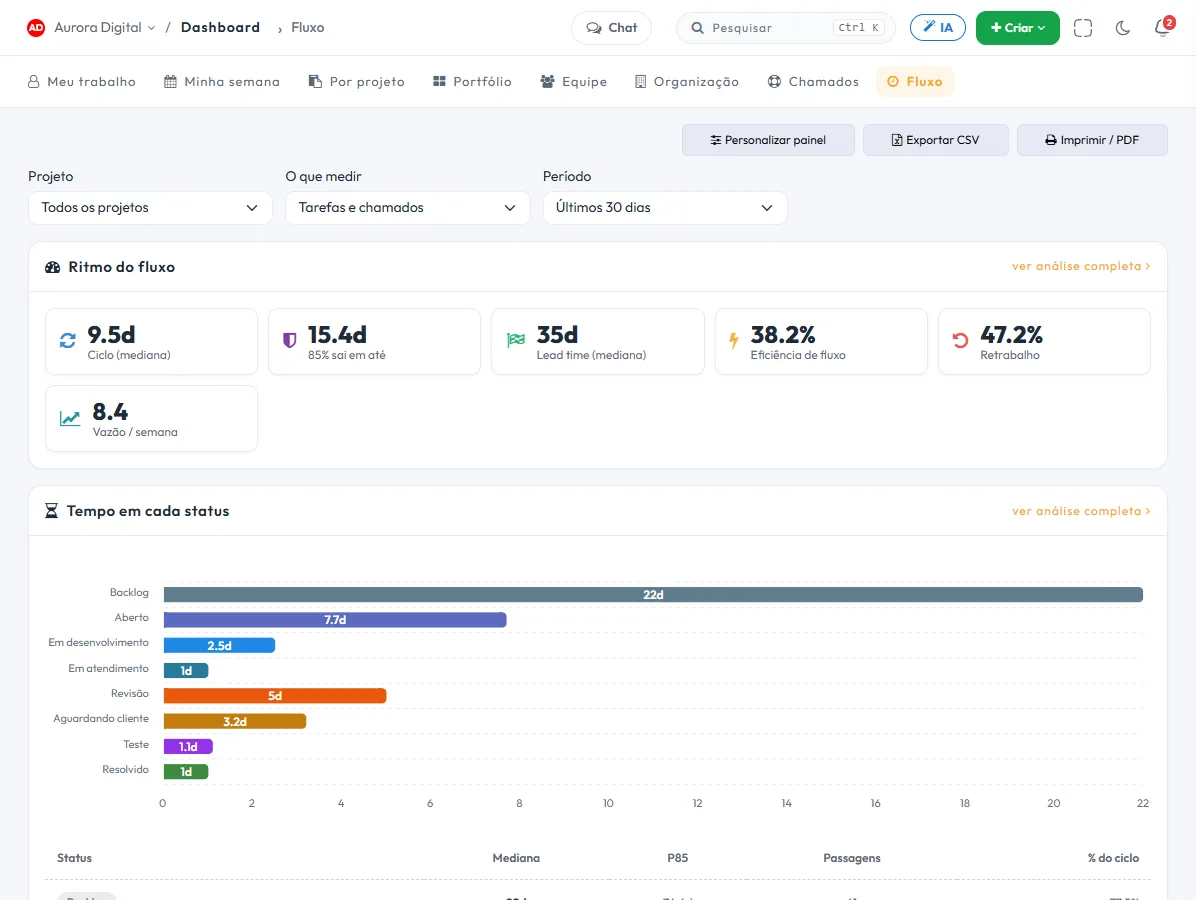
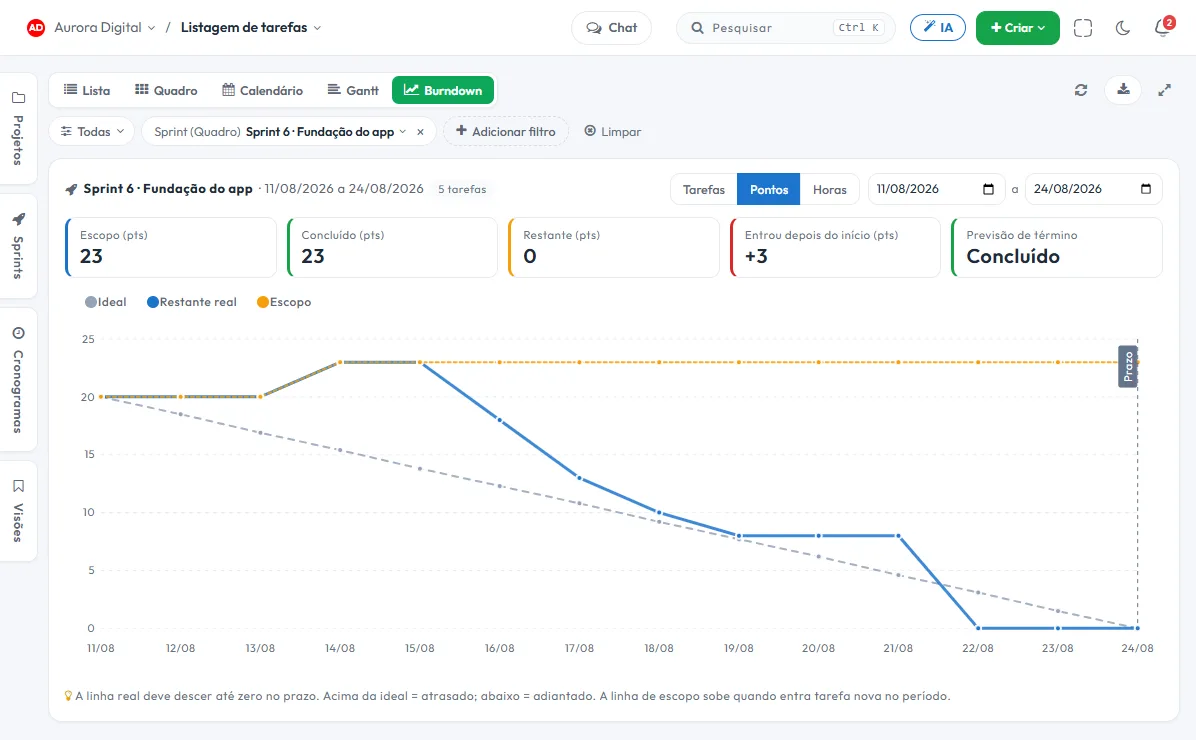
Will it make it in time? Ask the chart, not the night before.
Filter by sprint, client or person and switch to the Burndown view: the remaining work day by day, against the pace that finishes on time.
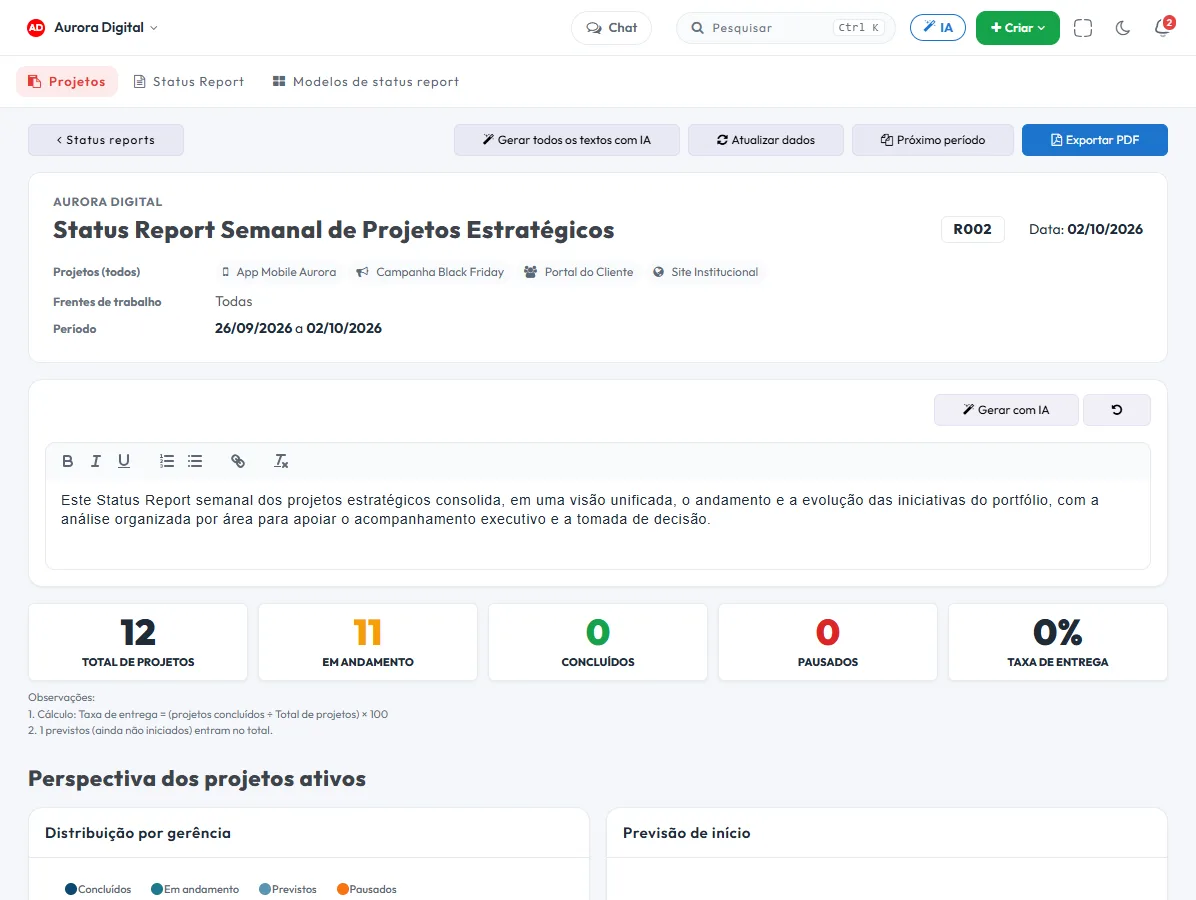
The weekly status report, without losing your whole Friday.
Choose the template, the projects and the period. Tasskee freezes the day's numbers, the AI writes the sections and the PDF comes out ready for the client or the board.
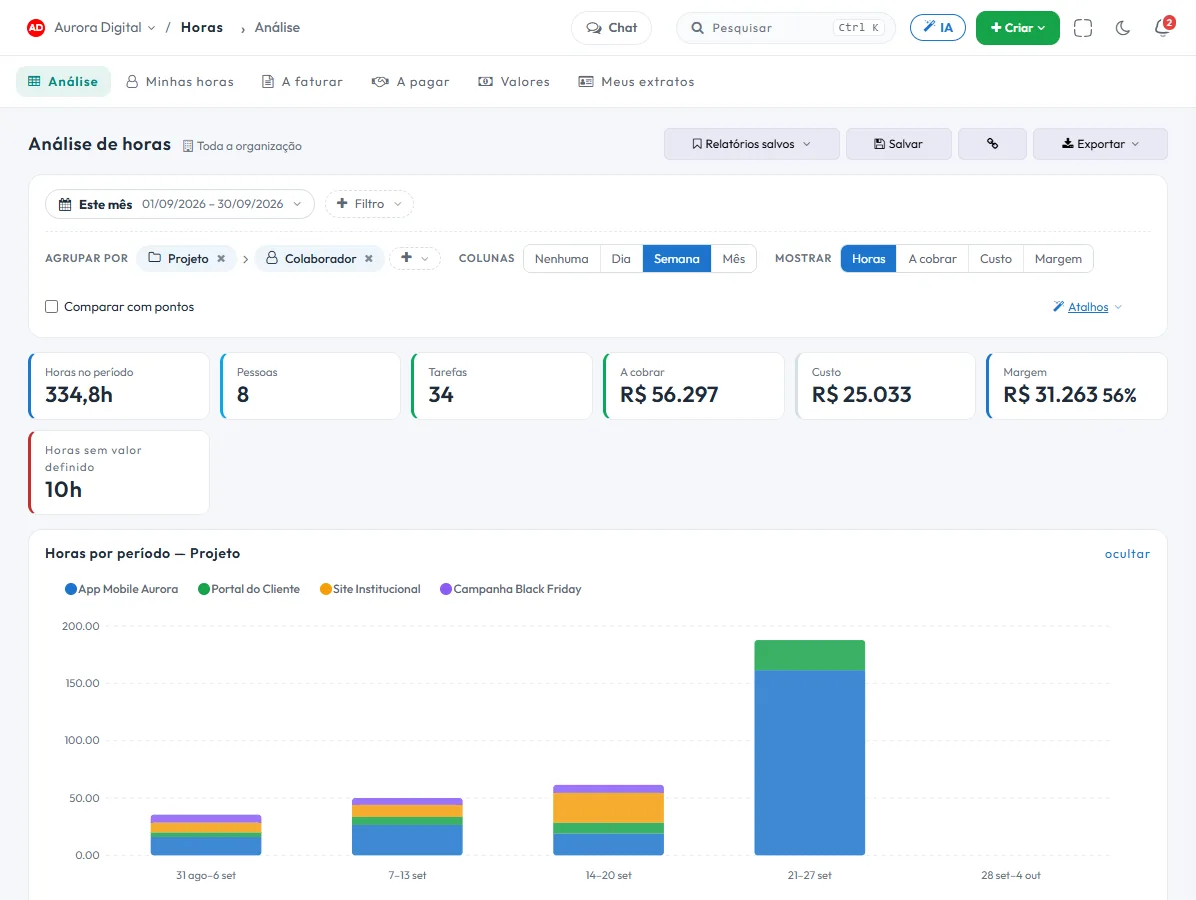
Every hour worked, billed and paid. No spreadsheet at the end of the month.
The team logs hours on the task. Tasskee totals them the way you want to see them, applies the right rate to each hour, and closes out what to bill the client and what to pay people who work by the hour.
Repetitive work done on its own, and explained.
When something happens, if the task is the right one, then the rule acts: it assigns, notifies, changes the status, chases the stalled task, and creates the task that comes up every Monday. Built as a plain sentence.
On every plan, including Free, with the month's counter always in view.
See how it works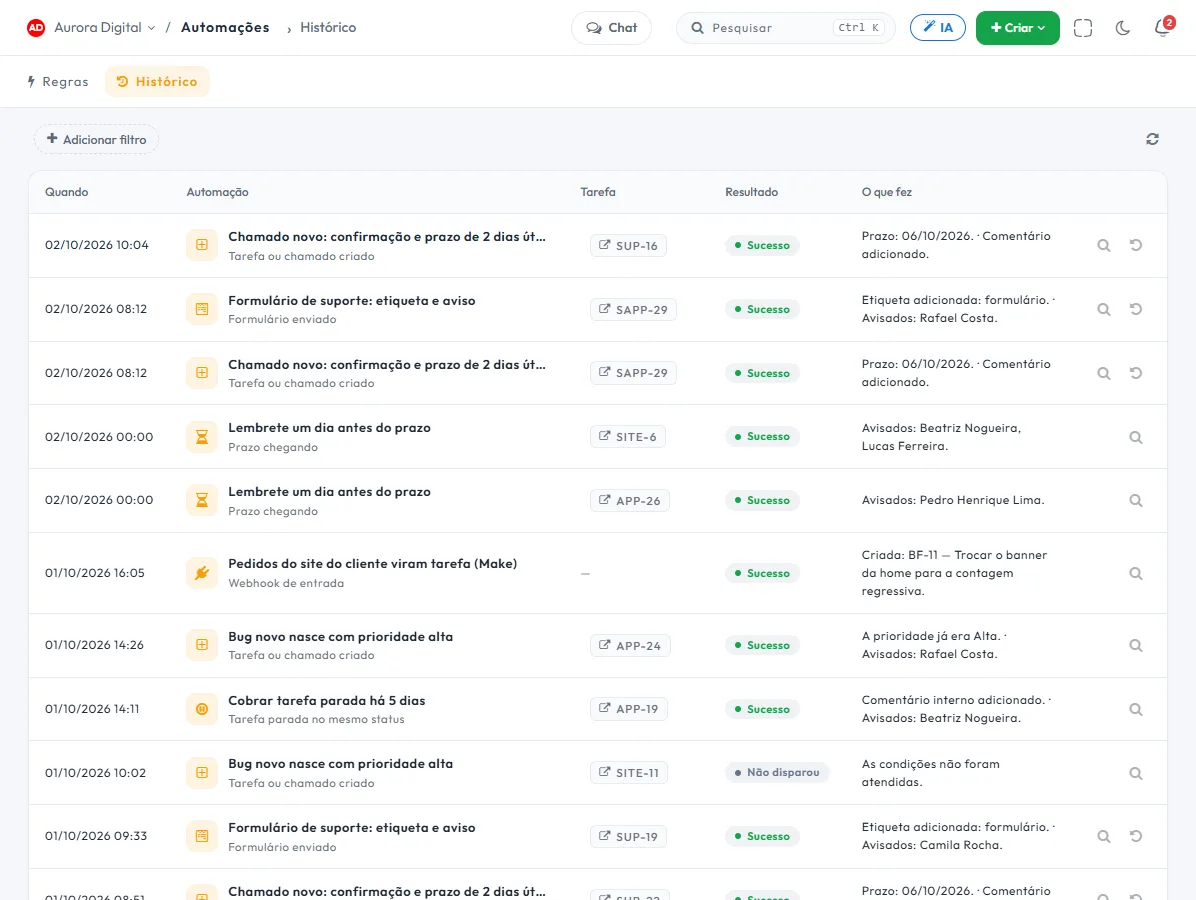
When your operation grows, the tool is already there
None of this gets in the way of someone who just wants a task board. But it's ready for the day you need it.
Sprints and saved views
Plan deliveries by sprint across projects, save filters as views, and share them with the team. Bulk actions let you update dozens of tasks at once.
Intake forms
A public link that creates a task or ticket in the right project, or collects the signed sign-off.
Time tracking
Estimated vs. actual by task, person and project.
Custom fields
Client, value, stage: the task speaks the language of your business.
Watchers and approvers
Whoever needs to follow along or give the OK stays in the loop.
Multiple organizations
One account for each company or client, with a one-click switch.
Change log
Who changed what, and when. On every task.
REST API, webhooks and MCP
Integrate with your ERP, CRM or website. Webhooks notify your systems when something changes, and MCP opens Tasskee to AI agents with the same permissions as the user.
Guest portal
The client follows the project without taking up a seat.
Dark mode
Because deadlines sometimes fall at night.
Swap the patchwork for one place
Every extra tool is another login, another invoice and another piece of information that doesn't talk to the rest.
How it usually goes
- A project tool billed in dollars
- A separate help desk for tickets
- A WhatsApp platform for the team
- One chat for the team and another place for documents
- A spreadsheet to pull it all together at the end of the month
- Projects, sprints, and schedule, in reais
- Tickets with forms and SLA
- WhatsApp and email with an AI agent
- Team chat and documents linked to tasks
- Reports and dashboards that already cross-reference everything
Example: 5 people on Pro with Customer Service Hub on one WhatsApp number comes to R$ 419/month, project management included.
One tool, 19 workstreams
Each has its own page, with real screens from the system. Start with the one that solves today's problem — the rest comes along.
Kanban board
Drag the task to another column and the whole team sees the progress.
ExploreSchedule (Gantt)
Deadlines, dependencies and milestones on a timeline the team understands.
ExploreSprints
Short cycles with backlog, burndown and the team's real velocity.
ExploreCalendar
Tasks on their due date, by month, week or day.
ExploreAutomations
"When → If → Then" rules that assign, notify and create recurring tasks — and explain why they acted.
ExploreWhatsApp Customer Service with AI
WhatsApp and email in one inbox, with AI, SLA and satisfaction survey.
ExploreTickets (help desk)
A dedicated queue for requests, with priority, SLA and assignee.
ExploreForms
A public link that becomes a task, ticket or signed receipt, in the right project.
ExploreClient portal
The client follows the project, comments and approves, without taking up a seat.
ExploreInternal chat
Chat with the team, one-on-one or in a group, in a floating window, without switching apps.
ExploreAI Assistant and MCP
Ask in plain language and the AI answers, creates and reorganizes — with your key.
ExploreDocuments
Specs, minutes and contracts linked to the task they explain.
ExploreSpecs with an AI agent (MCP)
Each project's specification, maintained by your AI agent and tracked by the manager.
ExploreGoals and OKRs
Objectives with progress that goes up on its own as tasks move.
ExploreReports and dashboards
Flow, time, delivery and load — numbers to decide with, not to decorate.
ExploreBurndown
The remaining work day by day, for any filter: sprint, client, person or project.
ExploreStatus Report
The weekly status report built from project data, with text written by AI and a PDF ready to send.
ExploreHours, billing and payment
Timesheet with free grouping, hourly rate, what to bill the client and what to pay hourly contractors.
ExploreTime in status and bottlenecks
How long a task stays in each stage, and where the process loses days.
ExploreTry everything. If it's not for you, you lose nothing.
1
You get all of Pro
Schedule, tickets, goals, reports and AI unlocked, no credit card required.
15
You choose the plan
Buy as many users as you need. Nothing is charged before you confirm.
Didn't choose? The account moves to Free
Your data stays. Anything over the limit remains visible and editable, you just can't create more.
Fair pricing, in reais, per user
You choose how many users to buy and change it whenever you want in the billing panel. No lock-in.
Free
- Tasks, subtasks, checklists, and comments
- List and Kanban
- Daily planner
- Personal list, just yours
- 10 documents
- 100 automation runs per month
- Email notifications
Start
- Everything in Free, plus:
- Unlimited custom fields and statuses
- Permission profiles
- Time tracking and estimates
- Watchers and approvers
- 6 essential reports
- REST API and webhooks
- 1,000 automation runs per month
Pro
- Everything in Start, plus:
- Calendar and schedule (Gantt)
- Sprints, saved views, and bulk actions
- Tickets and intake forms
- Goals and OKRs
- 19 reports and dashboards
- Billable and payable hours, with margin
- AI assistant and MCP server
- Internal team chat
- 10,000 automation runs per month
- You can sign up for Customer Service
Max
- Everything in Pro, plus:
- History and versions with unlimited retention
- 5× the API and MCP limit
- Automations with no run limit
- Boleto or Pix, with an invoice
- Assisted onboarding
- Priority support on WhatsApp
Compare all features
| Feature | Free | Start | Pro | Max |
|---|---|---|---|---|
| Limits | ||||
| Users | 3 | you choose | you choose | you choose |
| Projects | 3 | 10 | unlimited | unlimited |
| Organizations | 1 | 1 | 3 | unlimited |
| Portal guests | — | 5 | 50 | unlimited |
| Storage | 0,2 GB | 5 GB | 50 GB | 500 GB |
| Documents | 10 | 50 | unlimited | unlimited |
| Forms / submissions per month | — | 1 / 100 | 10 / 1.000 | unlimited |
| Work | ||||
| Tasks, subtasks, checklists, tags, and comments | ✓ | ✓ | ✓ | ✓ |
| List and Kanban | ✓ | ✓ | ✓ | ✓ |
| Daily planner | ✓ | ✓ | ✓ | ✓ |
| Custom fields and permission profiles | — | ✓ | ✓ | ✓ |
| Hours, estimate, watchers and approvers | — | ✓ | ✓ | ✓ |
| Calendar and schedule (Gantt) | — | — | ✓ | ✓ |
| Sprints, saved views, and bulk actions | — | — | ✓ | ✓ |
| Group the board by any field | — | — | ✓ | ✓ |
| Tickets (help desk) | — | — | ✓ | ✓ |
| Goals and OKRs | — | — | ✓ | ✓ |
| Automations (runs per month) | 100 | 1.000 | 10.000 | unlimited |
| AI actions and create automation with AI | — | — | ✓ | ✓ |
| Analysis and AI | ||||
| Reports | — | 6 | 19 | 19 |
| Hours analysis, hourly rates, billable and payable | — | — | ✓ | ✓ |
| Portfolio, team, and support dashboards | — | — | ✓ | ✓ |
| AI assistant and AI in tasks and docs | — | — | ✓ | ✓ |
| MCP Server | — | — | ✓ | 5× the limit |
| REST API and webhooks | — | ✓ | ✓ | 5× the limit |
| Team and governance | ||||
| Internal team chat | — | — | ✓ | ✓ |
| Change log | — | 7 days | 90 days | unlimited |
| Document versions | 15 days | 30 days | 90 days | unlimited |
| Customer Service (add-on per channel) | — | — | available to purchase | available to purchase |
| Payment | — | card | card | credit card, boleto, or PIX |
Conversations
- Conversations, transfer, internal notes and snooze
- 1 customer service team
- 10 templates and quick replies per channel
- Channel rules: business hours, delays, and handoff notice
Hub
- Everything in Conversas, plus:
- AI agent (1 per channel)
- AI automatic follow-up
- Convert a conversation into a ticket or task
- Contacts and customer service dashboard
- 3 teams and 50 templates per channel
Full
- Everything in Central, plus:
- SLA with alerts and reporting
- Customer satisfaction survey (CSAT)
- Record forms with indicators
- Unlimited teams, templates and AI agents
Questions everyone asks
What happens when the trial ends?
Do I need a credit card to try it?
How does per-user billing work?
Is WhatsApp Customer Service included?
Do I pay for the AI separately? What is BYOK?
Is Tasskee hard to set up?
Is my data safe?
Is there a lock-in? Can I cancel?
Your team organized, starting today.
Create your account, invite your team and start with the board. The rest is there when you need it.