

A help desk that leaves no one unanswered.
Tickets have their own queue, priority and deadline, separate from the team's planned work — and stay linked to the projects where the problem gets solved.
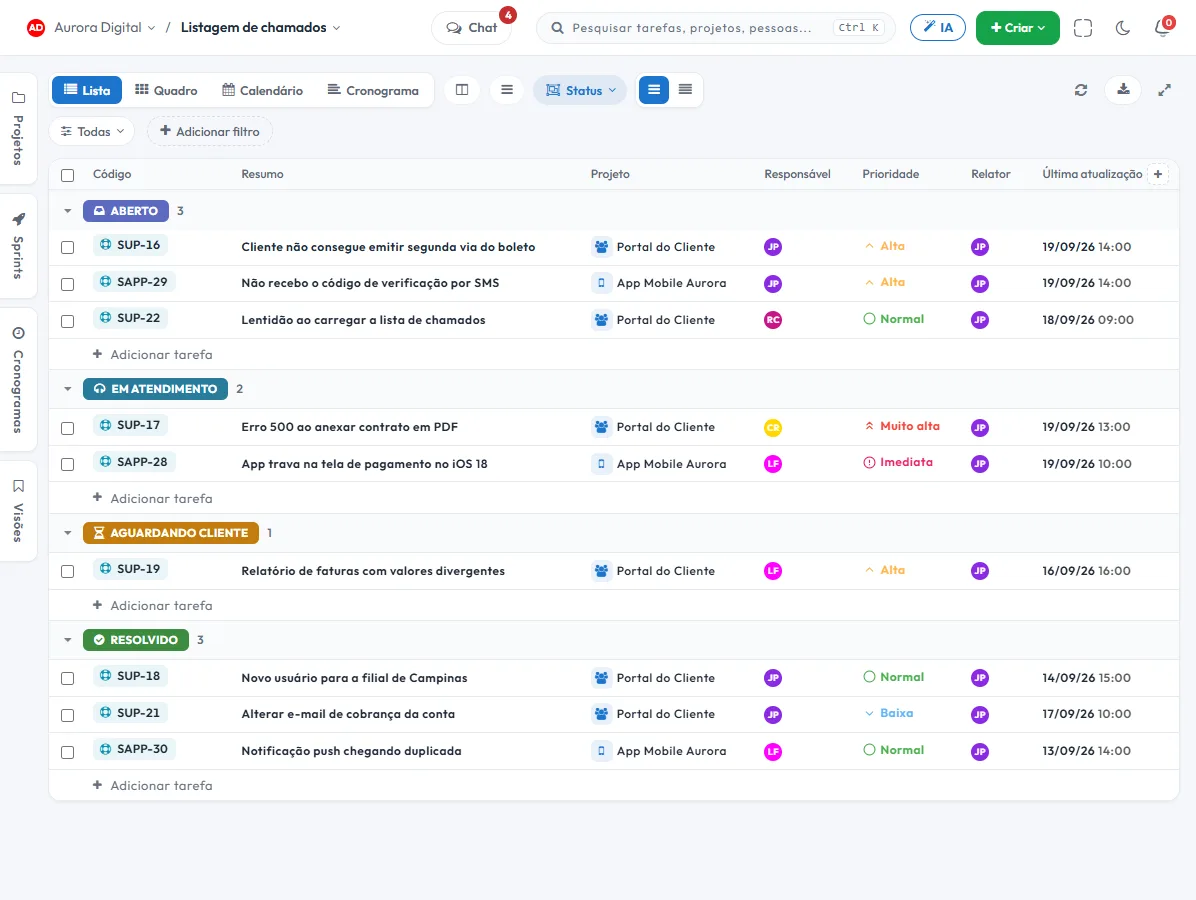
The request stops living in someone's email
While a ticket is a message in one person's inbox, it depends on their memory. In a queue, it has an owner, a deadline and a history.
Separate queue
Support and internal requests have their own status and priority, without mixing with the project's planned tasks.
A deadline that warns you
The SLA tracks response and resolution time, shows the countdown and warns before it is breached, not after.
Becomes a task when needed
Whatever requires the product or construction team becomes a task in the right project, with the ticket history attached.
Report by agent
Volume, response time and deadline compliance per person and per period, to size the team.
The ticket is born where the customer already is
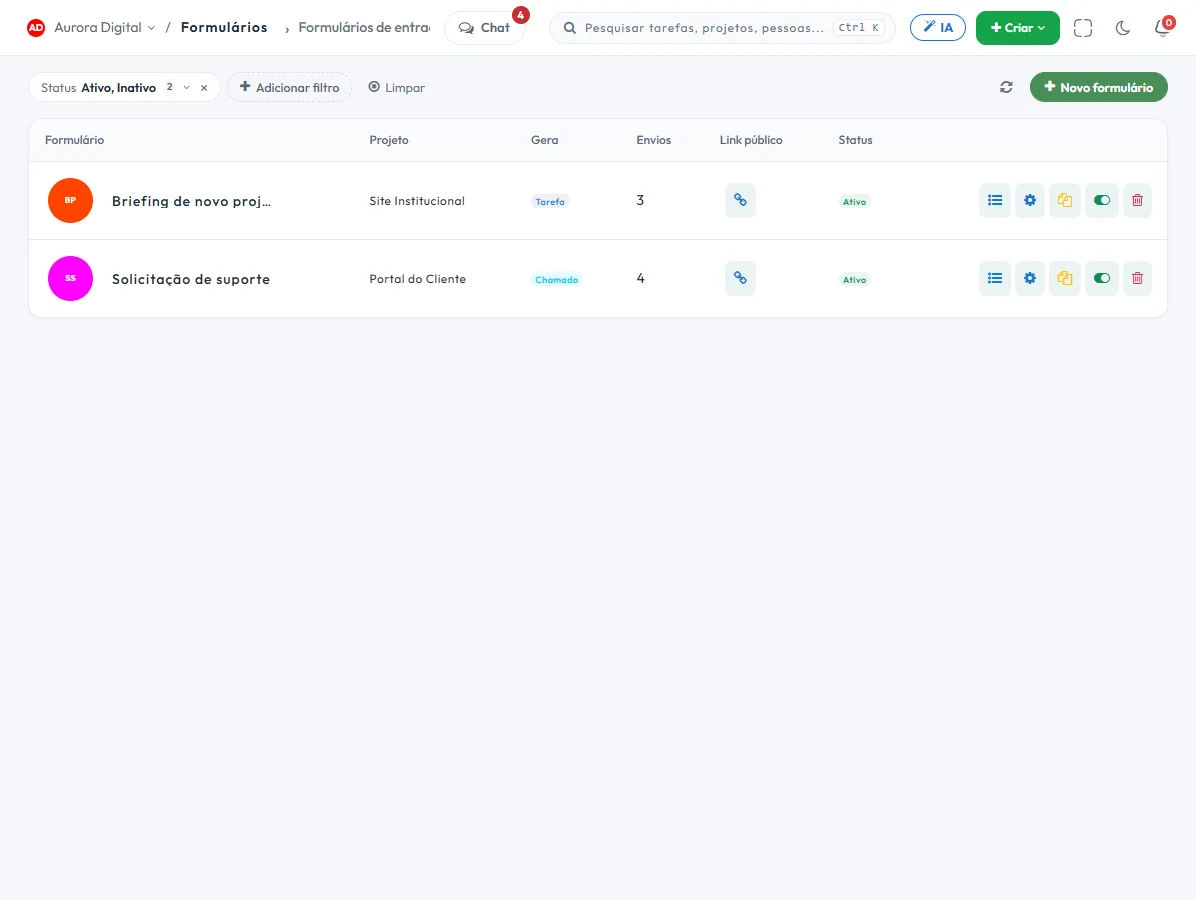
Nobody wants to learn a new portal to ask for help. The request comes in by form, by email or through a WhatsApp conversation and lands in the same queue.
- Public form, no login for the sender, with the fields you define
- Each submission opens the ticket in the right project and queue, with a reference number for the requester
- With Customer Service, the AI opens the ticket straight from the conversation and links it to the customer
- Attachments, screenshots and files come along, in the same place
This lives alongside the rest of the operation
Task, schedule, ticket, goal, and conversation are the same database. What changes in one place shows up in the other, with nothing to export.
How to organize a help desk with tickets in practice
Good customer service depends less on tools and more on three decisions: where requests come in, who answers and how fast. Here's how to set that up in Tasskee, from the intake form to the per-agent report.
Step by step
- Define the queue and the statuses. Tickets have their own statuses and priority, separate from project tasks. Create just a few: "New, In progress, Waiting on customer, Resolved".
- Create the public intake form. Whoever needs help fills in the form, no login required, with the fields you define (type of problem, description, attachment or screenshot). Each submission opens a ticket in the right queue, with a reference number.
- Set up the SLA. Define first-response and resolution deadlines. Each ticket shows the time remaining, the queue highlights the tightest one, and the alert arrives before the deadline is breached.
- Assign owners. Every ticket has an owner. Whoever joins the queue takes the next one from the top, not the easiest one.
- Convert to a task when it requires work. If resolving it needs the product or field team, the ticket becomes a task in the right project, and the two stay linked.
- Read the per-agent report. Volume, response time and SLA compliance by person and by period tell you whether the team is sized correctly.
Examples by type of company
IT and managed support company
A support company for small businesses separates requests by client. The public form receives the tickets, the SLA sets the first response, and the ones that need a site visit become tasks with a technical owner. The manager tracks, per agent, who has the fullest queue. Read more in IT and managed support.
Technical service provider
A building maintenance company receives requests from building managers and property administrators. Each request opens a ticket with a photo of the problem attached. If the repair needs a crew in the field, it becomes a task in the condominium's project. The building manager, if they want to follow along closely, joins as a guest in the client portal, without taking up a seat.
Accounting firm
The firm receives client questions by email, WhatsApp and phone, and misses deadlines because nobody knows who replied. With tickets, each question has an owner and a deadline. Those who subscribe to Customer Service (a per-channel add-on, alongside the Pro or Max plan) can also open the ticket straight from the WhatsApp conversation.
Ticket or task?
| Ticket | Task | |
|---|---|---|
| Origin | Someone outside the team asks | The team plans |
| Deadline | Response and resolution SLA | Delivery date |
| Where it lives | Its own queue | Project, board and schedule |
| If it requires work | Becomes a task, with the two linked | Stays in the project |
Best practices and common mistakes
- Respond within the SLA, even if the reply is "we're looking into it". Customers accept waiting; they don't accept silence.
- Don't leave a ticket in "Waiting on customer" forever. Set a closing rule and let the customer know.
- Avoid forms with twenty fields. Ask for the essentials; the rest comes in the conversation.
- Use automations to assign by type and notify the owner when the deadline is approaching.
- Don't mix tickets with planned work. When they mix, support tramples the project and vice versa.
Where tickets come from
The request arrives through a public form, by email or through a WhatsApp conversation (with Customer Service) and lands in the same queue, with attachments and screenshots included. The customer doesn't need a login to open one. For an example of how to organize this intake, see WhatsApp for support without the mess.
The first thirty days
Don't try to configure everything at once. In the first week, open the form and the queue with three statuses. In the second, define the first-response SLA and the owner for each type of request. In the third, look at the per-agent report and adjust the distribution. In the fourth, convert to tasks the requests that turned into rework. By the end of the month you'll have real data to decide whether you need more people, more automation or one more channel.
For the concept and the deadlines, read the SLA guide. If you're comparing with a free option, the post is a free ticketing system worth it? helps you decide. Tickets are part of the Pro plan; forms start on Start.
Questions about tickets
What is the difference between a ticket and a task?
Can I serve several customers on the same account?
Does the customer need to log in to open a ticket?
How does the SLA work?
Give your support team the organization it deserves
Centralize requests, meet deadlines and connect customer service to the operation that resolves them.